No one reads my blog. Have you caught yourself saying this after taking a peek at your analytics? If you’re worried that you are getting no blog traffic, there may be a few key reasons that we’ll explore in this blog post.
You may be producing beautiful content, full of visuals and on a beautifully designed blog. But if you haven’t optimized it for discovery online and made the content fantastic, your website is not getting traffic. This includes repeat visitors who come back for more.
Nobody reads your blog, so what can you do about it?
The good news is you can get your blog back on track with a few tweaks that will delight your readers and inspire them to share your posts with others.
Let’s save your blog growth timeline so that you’re reaching your goals.
In this blog post, we’ll explore what might be holding you back from getting engaged readers and social shares. How should you make your blog interesting to readers? I’ll be spilling the secrets.
By the end, you’ll have a checklist of tweaks to make so you’re never wondering – why is nobody reading my blog?

DISCLOSURE: This post contains affiliate links, meaning if you click on a product or service, and decide to purchase it, I may receive a commission at no extra cost to you. All recommended products and services are based on my positive experience with them. For more information, please read my Disclaimer.
Bookmark this post on Pinterest for future reference.

Why Your Blog Is Getting No Traffic – Quick Diagnosis
Many new bloggers think that the reason their blog has low traffic is because of a lack of blog promotion. Often, the real reason nobody is reading your blog is because of issues with discoverability and setup, including:
- Weak search intent in your blog topics
- Unoptimized blog post titles
- Thin content
- Missing promotional hooks.
Below are some of the top issues that I see:
- No clear search intent or keywords in each post
- Headlines that don’t match what people search
- Poor discoverability (no Pinterest pins, broken share buttons, no promotion)
We’ll explore these in detail and how you can fix them.
1. Is Your Topic Matching What People Search For? (SEO Check)
It might feel like nobody is reading your blog or sticking around, because the content isn’t interesting or relevant to them.
You get one chance to make a good first impression. And that starts with a headline and topic that reflects the value of your post while matching your audience’s search intent.
The Problem: Are You Writing With Your Audience In Mind?
One of the key reasons readers don’t click, read or share your blog posts is this: the topic doesn’t match your audience’s needs, interests or search intent.
It’s easy to write from your own perspective — what you want to talk about, find meaningful or think is relevant. But your audience may be looking for something completely different.
Ask yourself:
- Is this topic useful to my audience?
- Does it answer a question they are actively searching for?
- Will they immediately see why this post matters to them?
- Does the headline make the benefit or transformation clear?
Back in 2010, when I was starting out as a blogger, I made this exact mistake. I’d publish posts on whatever I was personally experiencing.
For example, like the time I was burned out before my wedding. Great therapy for me, but completely irrelevant to my audience. They got nothing out of it!
It’s not surprising that my blog traffic tanked.
Everything improved when I shifted to writing with intention. I chose topics based on problems my readers were trying to solve. I answered questions they were already asking.
When my content matched their search intent, and my headline aligned with it, my traffic and engagement improved quickly.
How To Fix It: Focus On The Reader’s Needs
A few things I always ask myself before I start writing a blog post are:
- What is the purpose of the blog post? Is it to inform/educate, entertain, inspire or persuade?
- What is the gist of the post, and how does it relate to my readers? Is this something that will help them answer a question, or will it interest them? Is it a hot topic?
- Do I have a good context for the post that I can add to the first few paragraphs to hook readers’ interest?
- What am I sharing information-wise? Is it thorough on the subject, and has stories, examples and visuals to make the blog post appealing?
- Is the topic evergreen – meaning that it’s not a seasonal topic, or no longer of interest (i.e. a passing trend).
- Have I researched and found the correct keywords for SEO, so my blog can be found in search engine results?
My next step is to write the blog post outline with the intro, the key points in the body and an idea for the conclusion.
Once I write my first draft, I always take a step back and re-read it a few times.
I always return to my initial blog post idea and ask myself if I have successfully conveyed the messages. If I haven’t, it’s time to edit!
At the end of the process, when I’m happy with what I’ve written, I move on to issue number two. The title!
PRO TIP: Use ChatGPT to review your blog content. Make sure your prompt is asking it to look for missing information that your competitors are including in their top-ranking posts on the same topic.
| RELATED: 100+ Popular Lifestyle Blog Post Topics To Jumpstart Your Blog Traffic Boost

2. Is Your SEO Title Converting Searches Into Clicks?
Ever look through Google search results, and none motivate you to click on anything?
That’s what happens when your own blog doesn’t grab attention.
The Problem: Lack Of An Interesting Blog Title
Your blog title is the very first impression a reader gets, whether they spot it on Google, Pinterest, social media or on your blog itself.
If it doesn’t communicate clearly what the blog is about, or why it’s worth reading, they’ll scroll past it.
If they aren’t reading it, they definitely aren’t sharing it!
Here are the top reasons why your blog title might be sabotaging your blog traffic:
- It doesn’t hook your reader’s curiosity
- It fails to highlight the main benefit or pain point
- It’s too vague, generic or lacks emotional pull
- It doesn’t match what your audience is actually searching for
PRO TIP: Every month, I update 3 to 4 blog post titles (both SEO titles that appear in Google results, and headlines) and update them. It’s important to tweak to see what appeals to readers more.
How To Get People Clicking On Your Post Title
I’ve written a complete blog post on how to write amazing blog post titles that get clicks, but here are a few quick tips:
- Lead with the pain point your audience cares about
- Use clear, simple language that’s easy to skim
- Make the benefit obvious – what will they learn or solve?
- Keep it specific so your readers understand the value
Here’s an example for this blog post:
OK Title: Tips For Good Blog Posts
Stronger Title: Why Nobody Reads Your Blog Posts And Easy Ways To Fix It
The second option is better because:
- It speaks to the pain point
- It promises a simple fix
- It’s more useful and engaging
Need help fine-tuning your headlines and blog titles?
I tested out my headline with Sharethrough Headline Analyzer – a free tool. I like how it breaks down the details of what makes for a good headline.


Write a few versions of your blog post title, keeping keywords and long-tail key phrases in mind for good SEO.
Test them out with a headline analyzer and tweak them so that they are the most attractive to readers.
3. Is Your Post Readable and Scan-Friendly?
There are several ways your blog’s and blog posts’ visual aspects can turn readers away. Nobody is reading your blog because it’s HARD to read it.
We’ll explore each in further detail so you don’t make these mistakes.
Visual Problem #1: The Font Isn’t Easy To Read
One of the key reasons why nobody is reading your blog is that it’s too difficult to read!
Font choices matter when it comes to websites.
- Serif fonts can look blurry or heavy on screens
- Sans-serif fonts are cleaner and easier on the eyes
- Busy or stylized fonts make your layout feel cluttered
If your page looks visually overwhelming before someone starts reading, it’s time for a font refresh.
How To Fix It: Use Sans Serif Fonts
- Stick to one font for headings and one for body text
- Avoid script fonts. They’re beautiful, but nearly impossible to skim
- Use a sans-serif font for your main text. Pair with either serif or sans serif headings
- Aim for 16–20px body font for readability
- Ensure link colours aren’t too light or washed out against a white background
Here’s an example of these tips in action:
See the difference?

Don’t Do This
These are two different serif fonts, and they make the text look busy.

Do This Instead
This is a serif font for the heading and a sans-serif font for the text. Easy to follow and differentiate.
PRO TIP: Make sure your font is easy to read: font size 16 to 20 for the body. Also, make sure that your chosen link colour isn’t too light, blending in with the white background.
Visual Problem #2: Heavy On The Text With Few Visuals
Nobody reads your blog because it has a solid wall of text on every blog post. If your blog posts don’t break up text with visuals, your readers will not return.
Think about it: would you rather read a 1,000-word blog post without any images or do you prefer visuals that support the messaging?
Visuals, graphics and videos make blog content more interesting and memorable. This is why social media relies on it so heavily.

Break Up Long Text With Relevant Visuals
How To Fix It: Use Relevant Images And Videos
Fix low blog traffic by impressing readers so that they return. Making your blog visually appealing means using photos and videos to emphasize your messages.
Some of this depends on your chosen WordPress theme and the blog post layout.
You can always update your blog theme: check out my list of top 10 favourite feminine WordPress themes.
But there are still a few things to consider when writing and formatting your blog post.
- Do I have an attractive feature photo that relates to my blog topic? If I don’t, I need to head check out my favourite FREE stock photo sites such as RawPixel, Unsplash, and Pexels.
- For fresh, rarely used stock photos, consider trying paid membership stock photo sites such as Styled Stock Society, PixiStock or Haute Stock.
- Are there any visuals that I can add to the body of my post? Keep them consistent in style and good quality, edited images.
- Can I add a video that I created or one created by somebody else that offers something of interest to my readers?
- For funny blog posts or ones where I can add a bit of humour, is there a good spot to add a GIF?
Here’s an example of me breaking up the heavy text with a visual – this pinnable image!
Like this post? Share it on Pinterest!

Visual Problem #3: There’s No Balanced Space On My Blog
If you’re still asking yourself, “Why does no one read my blog?”, it may be that your blog is hard to read.
Things that turn readers off are:
- Too many different fonts.
- The font is too tiny, and there aren’t any paragraph breaks.
- There are no headings to help readers scan the content.
- A multitude of colours.
- No sense of consistency with branding and visual elements.
- Photos that look like they were taken quickly with your phone in bad lighting.
- You’ve got too many pop-ups!
How To Fix It: Format For Balance
To attract repeat readers to your site and entice them to share your content here are a few fixes to consider:
- Keep it simple with fonts, as I noted above. One type of font for headers and one for the blog text.
- Adjust font sizes for readability: 16 – 20px for body text is good, even for aging eyes.
- Break up your paragraphs into 2 to 3 sentences per paragraph.
- Use headers to break up content where it makes sense. Use header size H2 for the start of a big section of content. H3 for sub-topics within an H2 section.
- Use a maximum of 2 to 3 colours, and a black/grey and white/off-white for contrasts.
- Keep your brand design consistent for a cohesive look.
- Use stock photography when you don’t have good ones you’ve taken yourself. If you’re taking your own photos, do them by a window for natural light. Edit them with attention to the brightness, contrast, and sharpness of your image.
- Limit your pop-ups. Ideally, don’t use them at all. Keep only the essentials, such as a cookie notice, and perhaps one unobtrusive one for newsletter sign-ups.
- Balance content with white space. Minimalist, spacious layout creates a better site visitor experience.
4. Are You Giving Readers a Reason to Stay on Your Blog?
One of the key reasons why nobody reads your blog is that you aren’t keeping them on your blog. When you keep them exploring your blog longer, they’re more likely to keep coming back for more.
The Problem: Readers Aren’t Sticking Around Or Coming Back To Your Site
Readers bounce into your site to read a blog post and then leave. There’s nothing to keep them exploring or coming back later to check out more content.
How To Fix It: Focus On Engagement
To keep your site visitors on your website longer, engaged and coming back, here are key things to do:
- Add internal links in blog posts
- Include calls-to-action within posts, such as free offer opt-ins
- Highlights pointing to your top resources/favourite tools pages
- Include social media plugins with prompts to share
Encourage readers to explore more of your blog.
PRO TIP: Do you have a Pinterest account for your blog? If you’re adding Pinterest pin images to your site, you will want to invest in Tasty Pins. This gives you the control to add a “pin it” button to specific images that you prefer to have pinned. It also helps with back-end analytics with Pinterest and ensures your pin images include the preferred descriptions that you optimize with Pinterest keywords.
| RELATED: How To Promote Your Blog Content With Over 12 Free Strategies
5. Do Your Blog Posts Include Pinterest-Ready Images That Drive Traffic?
Speaking of Pinterest pins, do you include them on your blog? Pinterest is one of the top drivers of traffic for many niches within the lifestyle category.
Consider all of the popular niches on Pinterest. If your blog falls under one of them, you should be marketing your blog to Pinterest users. I get about 40% of blog traffic from Pinterest, after Google.
With the way Pinterest works, encouraging pin saves is an important way to drive more traffic.
Engagement, saves, and re-pins indicate to Pinterest that your content is worthy of being ranked higher in search results. It’s also promoted in home feeds.
Make it easy for your site visitors to pin your blog content to generate more traffic from Pinterest.
The Problem: You Haven’t Added Pinnable Pinterest Pin Images To Your Blog Posts
When you don’t add Pinterest pin images to your blog posts, you limit the chance of a site visitor pinning it to one of their Pinterest boards. This reduces your opportunities on Pinterest — a huge driver of website traffic.
Pinterest pin images are distinct: they are in a 2:3 ratio, with appealing visuals and text that leverages copywriting best practices to attract clicks. They also need to be positioned in spots that encourage pinning.
By adding Pinterest pins, I’ve successfully grown my blog traffic using Pinterest.
How To Fix It: Add Pinterest Pin Images And Make Them Easily Pinnable
Adding one or two images to your blog post that are optimized for Pinterest makes it much easier for others to pin your post to their Pinterest boards.
The key is that you need to make a Pinterest pin image beautiful. Nobody wants to share ugly pins publicly on their Pinterest account.
Some key elements for a beautiful, clickworthy pin include:
- Size of at least 1000 x 1500 px (2:3 ratio)
- Relevant, attractive image (use stock photos for a professional look)
- Easy-to-read, large fonts and catchy text
- Text that drives clicks
Here is an example of two pins that I created. Which one would you be more likely to pin?
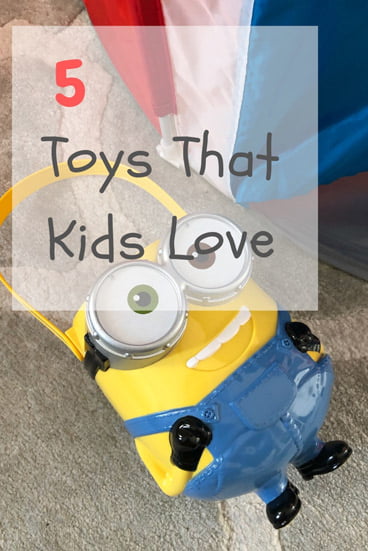
What’s wrong with this pin?
- The photo is dark and hasn’t been carefully thought out in placement.
- The font is juvenile – kids aren’t pinning images, their parents are. Use attractive fonts.
- The copy is to the side, and the white square is too transparent.

What’s good about this pin?
- It’s bright and crisp, catching the eye. The toys have been placed in an aesthetically appealing way.
- The fonts are classic and clean.
- The white square is just transparent enough, but doesn’t wash out the text.
- The text is at the top, where the eye is naturally drawn first.
Nobody reads your blog because they don’t know about it! Make it easy for others to pin your Pinterest images and make your content more discoverable.
Use a Pin It button feature on the actual pin image to make it super simple for others to pin your images. To optimize your pin description with keywords, use a tool like WP Tasty Pins plugin.
To make it easier for you to create beautiful pins, I have these FREE Pinterest pin templates for Canva.
| RELATED: How To Easily Design Pinterest Pins That’ll Attract Clicks
How To Stop Saying “No One Reads My Blog”: Fix Your Visual Branding
If your website is not getting traffic, it may have something to do with your visual branding and website design.
Here’s something to consider when you sit down to create a blog post.
Just like when you’re going on a date or an interview, how you present your blog is how people will perceive it.
A visually appealing blog goes a long way in creating a GREAT first impression with potential brand partners and readers alike.

Bluntly put, brands don’t want to be associated with crappy-looking blogs.
With readers, it’s the same. Nobody wants to share information that’s not packaged nicely and in an easy-to-read format.
It may be time to do a blog audit to address site visitor experience issues. I want you to go from saying that no one reads my blog to my blog is growing!
| RELATED: 15 Ways To Create A Professional-Looking Blog Right From The Star
A Few Other Key Reasons Why Nobody Is Reading Your Blog
While what you’re writing and how you’re presenting it are key factors why nobody is reading your blog, there’s also the question of blog marketing.
Ask yourself: “Have I promoted my blog enough?”
Blogging is 30% content creation and 70% promotion.
If your website is not getting traffic, ask yourself:
- Have I optimized my blog content with good SEO practices?
- Did I share the blog post on my Facebook page?
- Did I pin a few pins to Pinterest over a period of time?
- Have I shared it on Instagram? TikTok (if relevant)
You can always re-share old blog posts (especially when you update blog posts or republish them). What’s old is new again!
| RELATED: Ten SEO Tips For Bloggers – How To Get Your Blog Found In Google Searches
How To Use Facebook Groups To Grow Your Blog And Business
How To Use Social Media To Boost Your Blog Traffic
How To Create And Use Your Blogger Networks To Grow Your Blog
How to Improve Your Blog and Keep Readers Coming Back
If you’re tired of saying “no one reads my blog,” focus on these foundational fixes:
- Choose topics people are actively searching for. Write with search intent in mind, not just personal interest. Your content should answer real questions your audience wants solved.
- Align every post with your audience’s needs. Make the benefit clear immediately. Readers should know why the post matters to them within seconds.
- Write SEO titles that earn clicks. Use headlines that highlight a pain point, promise a solution, and clearly communicate value—without being vague or generic.
- Make your posts easy to read and scan. Use clean fonts, readable sizes (16–20px), short paragraphs, and clear H2/H3 headings so readers can skim comfortably.
- Break up text with visuals. Add relevant images, graphics, videos, or pinnable visuals to make content more engaging and memorable.
- Create visual balance and white space. Limit fonts, colours, and design elements. A clean, uncluttered layout keeps readers from feeling overwhelmed.
- Give readers a reason to stay on your site. Use internal links, calls-to-action, featured resources, and prompts to explore more of your content.
- Add Pinterest-ready images to every post. Include vertical, clickworthy pins that are easy to save and share to extend your reach and drive ongoing traffic.
- Optimize your blog for discovery, not just aesthetics. Beautiful design isn’t enough. Your content must be findable through SEO, Pinterest, and consistent promotion.
- Promote your content consistently. Share posts across platforms, re-pin over time, and resurface updated content. Blogging success is content and distribution.
Start writing great blog posts that people will appreciate!
Don’t forget to check out my recommended blog tools and resources with everything you need to help you get to the next level with your blog!
QUESTION: If your website is not getting traffic, are one of these reasons why you’re struggling? Share what you plan to do to fix it.
Like this post? Share it on Pinterest.







? You’re assuming someone is actually seeing the blog and isn’t interested. No! Nobody is visiting at all. No one sees the blog, or how visually appealing it is, or the content, or anything else. No one comes at all at any time no matter how I plug the blog ad nauseum. Other blogs with similar content get traffic. I get none, and when I say none, I mean zero.
How are you promoting your blogs? Are they optimized for SEO? Are you updating your blog content? Are you promoting your content where your actual readers are? Do you know your target audience and their pain points? Is your blog content addressing those pain points? Is your promotional content effectively attracting clicks – i.e. is your copy speaking to the problem and a solution? For example “How To Start A Blog” as a pin title versus “How To EASILY Start A Blog In 10 Simple Steps – A Roadmap To Launching A Profitable Blog”. Which one would you click on? There is always a FIX for this problem, unless your blog niche is so focused that your audience is 100 people, there is always a way to fix the traffic problem.
Every time that I read one of your posts, I learn something new. Thank you very much!
I am about to start my blog and I am taking notes. I will definitely
apply all these tips to my blog.
Thanks for this post
You are most welcome! Would love to see your blog when it’s live!
Definitely repinning this! Thanks!
Thank you!
These are great tips! I need to go through and change my titles. I need to start making outlines too. I feel like I just think of an idea and write. The only thing I truly plan on it my recipe posts.
This was very insightful and helpful. Thanks for sharing your ideas 😊
Great tips! I figured out my content wasn’t being shared because my pins sucked. They were pretty but not stand outish!
I had the same problem. The titles sucked for mine.
I love your font tip as well as the others! Visuals are such a large element to making a blog appealing. If it looks icky, why would people sticky? Haha! Wonderful tips!
I love that line! I might have to borrow it. 🙂
REALLY Helpful tips!! I’m going to be changing my fonts and images and always testing to see which one works best.
Also I need to add social sharing buttons to my site.
Thanks
So glad to help out with tips. Let me know if you need feedback on fonts. Happy to help!
This is amazing ideas and tips. Definitely will be taking them into consideration. Thanks for sharing.
I’m just starting out with my blog (less than ten posts!) and I will definitely take these tips into consideration! Makes me want to go tweak a few things now. ❤️
Perfect! The tweaks won’t take long. 🙂
This is very insightful! I love how you gave us various solutions to improve our blogs. Blogging is hard work and people like you who are willing to help make it bearable! 😛 Thank you for sharing!!
This is very enlightening. Thank you for sharing.
You’re welcome!
This was very helpful. My biggest takeaway after reading is that I need to embed pins in my post and make them super easy to pin! Thank you!
It’s so much easier for somebody to pin your post! Glad to help.