
Learning how to promote your blog is a key marketing skill bloggers need. Where do blogs generate traffic? How do you reach your audience?
Once you hit publish, the content marketing part of blogging starts. As a blogging coach, one challenge my clients face is where to promote blog posts.
If you’re wondering how to promote your blog for free, the good news is that several strategies can work for your blog niche.
Growing blog traffic is a top concern for bloggers, as it’s tied to monetization. Promoting your content is part of the blog growth strategy you should be implementing.
In this post, I’ll share some of the best places to promote your blog post for free. Some will work for your blog niche — you’ll have to test them out yourself. At the end of this post, you’ll have a selection of potential ways to promote blog posts and grow your blog.

DISCLOSURE: This post contains affiliate links, meaning if you click on a product or service, and decide to purchase it, I may receive a commission at no extra cost to you. All recommended products and services are based on my positive experience with them. For more information, please read my Disclaimer.
Bookmark this post on Pinterest for future reference.
How To Promote Your Blog For Free To Increase Blog Traffic
You’ve just started a blog and launched it. You’re creating content and publishing blog posts weekly. But what are some of the ways to get more traffic?
I’ve used many different sources in the past few years. Good on-page SEO practices have always been a key way to boost traffic. You can also use social media to promote your blog.
While this post shares several ways to promote your blog posts, my top tip is to use promotion strategies and channels that your key audience uses! Don’t waste your time with a platform that doesn’t get you results.
Choose perhaps three to four channels I’ve shared below and see how they work in boosting your blog traffic. If they aren’t giving you results, it might be time to change your strategy to find what works best for your blog.
Optimizing Your Posts For SEO Is A Given
You’ll notice one thing missing in my list below: I don’t reference SEO.
This is because you should be optimizing your blog content before you hit publish – every single time.
This includes interlinking your old posts with your new ones and vice versa. What you’ll get below are other ways you should promote your blog AFTER you publish it.
If you want to learn about SEO, read my post on on-page SEO tips for beginners.
4 Key Goals For Promoting Your Blog
Promoting your blog can help you achieve four key goals:
- Help readers discover your content
- Bring readers back to your blog
- Build interest in your insights and expertise
- Reach people through communities and connections
If you own a product- or service-based business, all of these are important for nurturing your readers along a journey to eventual purchases.
Which Blog Promotion Methods Should You Try?
Each method serves a different goal.
Some can bring visitors to your blog soon after you share a link, while others take time to build awareness, trust and ongoing traffic. You will want to have a blend of these for your blog promotion strategy.
| Promotion Method | Best For | When To Expect Traffic Growth |
|---|---|---|
| Discovery and article clicks | Usually builds over time | |
| YouTube | Searchable tutorials and expertise | Usually builds over time |
| Introducing articles to new readers | Variable; occasional bursts | |
| Google Business Profile updates* | Reaching potential local customers | Depends on profile visibility and interest |
| Email newsletter | Bringing interested readers back | Quicker with engaged subscribers |
| Your own Facebook group | Return visits and community | Quicker with an active group |
| Awareness and interest | Website visits usually take time | |
| Threads | Conversations and sharing expertise | Audience-dependent |
| TikTok | Awareness and personal branding | Website visits usually take time |
| LinkedIn, including newsletters | Professional credibility and readership | Audience-dependent |
| X | Conversations and relevant article links | Audience-dependent |
| Facebook page | Sharing content with followers | Audience-dependent |
| Substack | Personal perspectives and reader relationships | Usually gradual |
| Medium | Sharing expertise with new readers | Usually gradual |
| Other Facebook groups | Relevant conversations and referrals | Individual clicks may come sooner |
| Answering questions and earning trust | Trust takes time; individual clicks can come sooner | |
| Quora | Sharing helpful answers and expertise | Usually gradual |
| Niche forums | Community relationships and referrals | Varies with participation and community activity |
| Guest posting | Reaching another publication’s audience | Takes time to arrange; visits may follow publication |
| Interviews and expert contributions | Credibility and exposure | Depends on securing coverage and publication timing |
| Podcast appearances | Awareness and credibility | Takes time to arrange; visits may follow publication |
| Email signature | Everyday referrals | Quick to set up; usually modest traffic |
In some cases, traffic that you think comes quickly isn’t always guaranteed.
Algorithms can affect results, as can your niche, audience, content and consistency. If you have an established following, it can make a big difference.
NOTE: *Google Business Profiles are only for eligible businesses that offer in-person services. If you’re a coach, consultant or freelancer who can offer in-person meetings with clients, you may be eligible. Online-only blogs and businesses aren’t eligible.
Goal 1: Help New Readers Discover Your Content
Let’s look at how to grow blog traffic by improving online visibility for your content.
1. Use Pinterest For Promoting Your Blog
How to promote your blog for free? By using a visual search engine: Pinterest!
Aside from SEO, Pinterest is the second-best way to promote your blog content.
Pinterest is a visual search engine and my second-highest source of blog traffic. For some, it’s the first, depending on their niche, audience and Pinterest strategy.
Pinning consistently, along with a few other strategies, helped me achieve the increase in outbound clicks for MargaretBourne.com shown below.
Considering that blogging tips aren’t as widely searched on Pinterest as many lifestyle topics, this was a big win for my site!
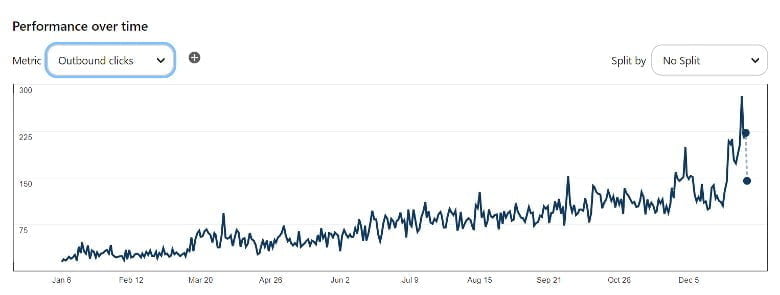
Although creating fresh pins is part of my strategy, some of my older pins are still driving traffic.
The key is to start with a consistent pinning schedule you can maintain. Although I try to pin daily, pinning fresh content weekly is OK too. Create original pins regularly, test different designs and topics, and pay attention to which ones generate outbound clicks to your blog.
Pinterest usually takes a few months to build momentum. So give your strategy time before deciding whether it’s working for you.
I have several blog posts to help you get started and improve your results:
- How To Consistently Grow Blog Traffic With Pinterest: My Three Secret Strategies
- How To Create Attractive Pinterest Pins That Result In Link Clicks & Increase Blog Traffic
- 11 Pinterest Tips For Bloggers
If Pinterest is a good fit for your niche, set aside time to design pins, write titles and descriptions with relevant keywords, and schedule your content. Focus on attracting people who’ll find your blog posts useful, rather than chasing impressions alone. Outbound clicks to your site are more important than impressions.
If you want to master Pinterest, I’ve created an easy-to-follow course: Pin It Better: A Blogger’s Guide To Pinterest. Learn how you can make it a huge driver of your traffic as well!
In the meantime, get my FREE Pinterest pin templates for Canva:
Using Tailwind To Schedule Your Pins
Designing pins, writing descriptions, and publishing consistently takes time. Tailwind is a scheduling tool that can help you organize this part of your blog promotion routine.
When I started MargaretBourne.com, I used Tailwind to schedule my pins so I could spend more time developing blog content.
Instead of scheduling pins individually throughout the week, you can batch your pin designs, titles and descriptions, then schedule them in advance. This makes it easier to maintain a consistent presence when you’re busy with other blogging tasks.
Tailwind is optional. You can also use Pinterest’s own scheduler. The goal is to find a process that works for your schedule and budget.
PRO TIP: Scheduling saves time, but review your results regularly. Look at which pins generate outbound clicks, then use those insights to help you prepare your next batch.
| RELATED: My Tailwind For Pinterest Review And Guide
2. Repackage Blog Content On YouTube
Have a YouTube channel? One of the best ways to promote your blog posts is to take some of the content and repurpose it for a tutorial or a walkthrough video.
Choose a topic that could use a demonstration or deeper explanation. Answer the viewer’s question in the video, and give them a reason to visit your blog for more information. You can also share more resources or a related source.
Don’t forget to add the relevant blog link in the description. This is where clickable links are permitted. Include a call-to-action at the end of the video and explain what they will learn by visiting your blog post.
YouTube is where people look for answers every day. A useful video can help new viewers discover your expertise and encourage them to explore your blog. It can take time to build an audience, so treat YouTube as a longer-term promotion method.
NOTE: Optimize your title and description for your video listing. YouTube relies on SEO, and Google will show relevant videos in both traditional and AI Overview/AI Mode search results.
3. Using Flipboard To Promote Your Blog
I had a blog post go viral on Flipboard, so the opportunity to promote blog posts successfully is there!
Flipboard is a platform where you can create digital magazines and “flip” your blog posts into them. Think of each magazine as a collection of articles on a particular topic.
Here’s one of my magazines – for Blogging Tips & Social Media.

When readers click through to read an article you’ve shared, they visit your blog. This gives you another opportunity to introduce your content to people interested in your niche.
Building a presence takes some effort. Follow relevant magazines and people, read their content, and join conversations where you have something useful to add. Focus on creating magazines that people will want to explore and follow.
A few key tips:
- Create magazines around specific topics, such as “Blogging Tips” or “Parenting Life”
- Flip your blog posts into the relevant magazines
- Include older posts that are still useful and up to date
- Add relevant content from other sources alongside your own for variety
- Include a short comment explaining why an article is worth reading
Flipboard can bring bursts of traffic, but results can be unpredictable. Treat it as an additional discovery channel and check whether the visits it brings justify the time you spend there.
It takes only a few seconds to add your post to Flipboard. Make it a simple 2-minute promo activity.
You can follow my Flipboard profile and magazines!
4. Share Blog Content Through Google Business Profile Updates
If your blog supports a local business, Google Business Profile updates offer another place to share relevant blog posts. These updates can appear on your business profile in Google Search and Maps.
For example, if you offer social media content creation services to local businesses, you could share a link to using video content and link to a blog post with more ideas. A life coach can share tips on how to balance busy careers with family commitments.
You don’t need to copy your entire article. Give potential customers a useful takeaway and a reason to read more.
As I offer local blog coaching services, as well as online sessions, I have a Google Business Profile for which I update blog content.
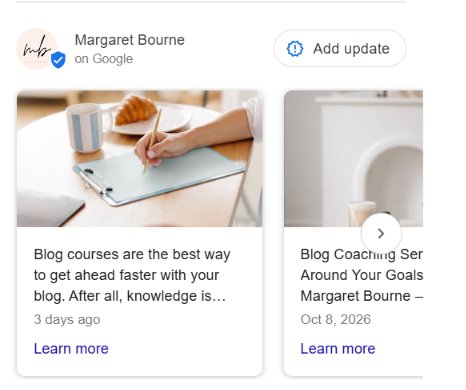
Here’s what to include:
- A short introduction that explains how the topic helps your customers
- A relevant image
- A “Learn more” button linking directly to the blog post
Choose articles that connect with your business and the questions your customers ask. Older posts can work too, provided the information is still accurate and relevant. You can also promote your service pages.
IMPORTANT: Google Business Profiles are for eligible businesses that serve customers in person, either at a business location or by visiting customers. Online-only blogs and businesses aren’t eligible. If you already have an eligible profile, try adding relevant blog posts to your updates and check whether they bring interested visitors to your site.
Goal 2: Bring Readers Back To Your Blog
Attracting new readers is only part of growing your blog. Look at ways to promote your blog that give people a reason to return. This builds an audience that gets to know your content and trusts your expertise.
5. Get Free Traffic Through Your Newsletter
This is one of the best ways to bring readers back to your blog, since you’re building an email list rather than relying entirely on social media followers.
Your newsletter gives you an ongoing way to communicate with people who’ve signed up to hear from you. Share useful tips, personal insights and relevant links that give them a reason to visit your blog again.
You can promote your posts in several ways:
- Share a weekly round-up of your latest blog posts
- Give readers a behind-the-scenes look at something you’re working on, with links to related posts
- Discuss a timely topic and include relevant articles for readers who want more detail
- Highlight a popular post and explain why it’s worth reading
How you communicate matters. Give readers something useful in the email itself, then link to blog posts that help them take the next step.
PRO TIP: Include your best blog posts in your welcome email series. It’s an opportunity to introduce new subscribers to helpful content they might otherwise miss.
How often should you send a newsletter?
Personally, I prefer receiving one or two useful emails a week from bloggers. If I’m getting a notification every time someone publishes a post, I’m more likely to unsubscribe. My inbox is busy enough!
A weekly newsletter is a good starting point, but choose a schedule you can maintain and tell subscribers what to expect when they sign up. Monthly can work too, although it gives you fewer opportunities to stay in touch. Remember the saying “Out of sight, out of mind.”
You don’t need a new blog post every time you send an email. I share older content that’s still accurate and relevant to my newsletter topic or the season. I explain how it can help my readers.
While I’ve got your attention, you can sign up for my free Blog Post Planner template:
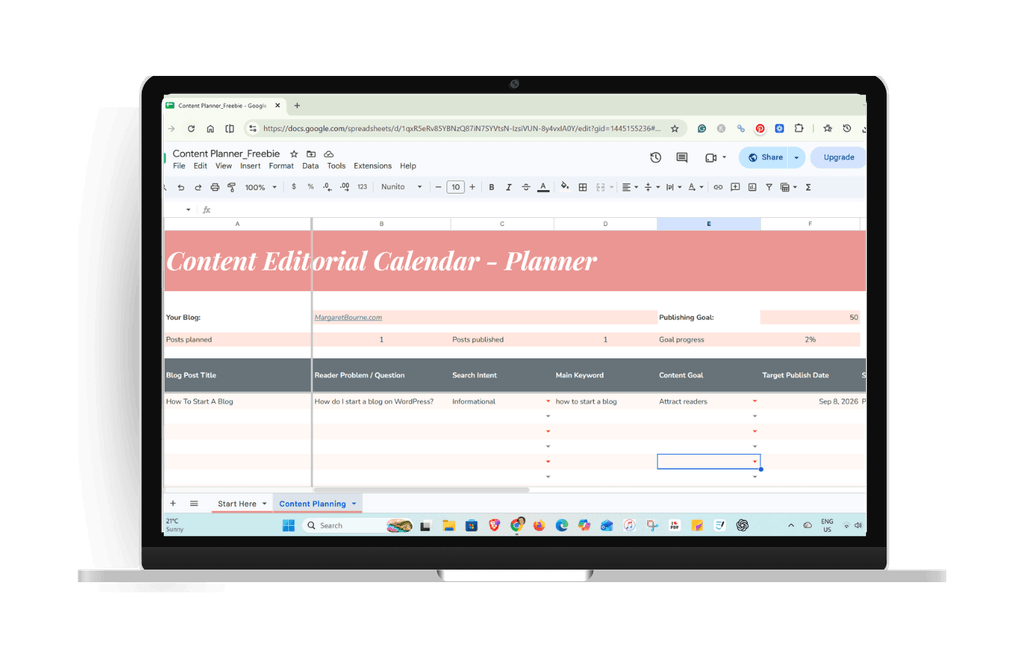
Get A Free Blog Content Editorial Calendar Template For Google Sheets
Organize your ideas in this easy-to-use blog post editorial calendar. Start planning today!
| READ MORE: How To Grow Your Blog Email List Using Freebie Opt-Ins
6. Promote Blog Posts In Your Facebook Group
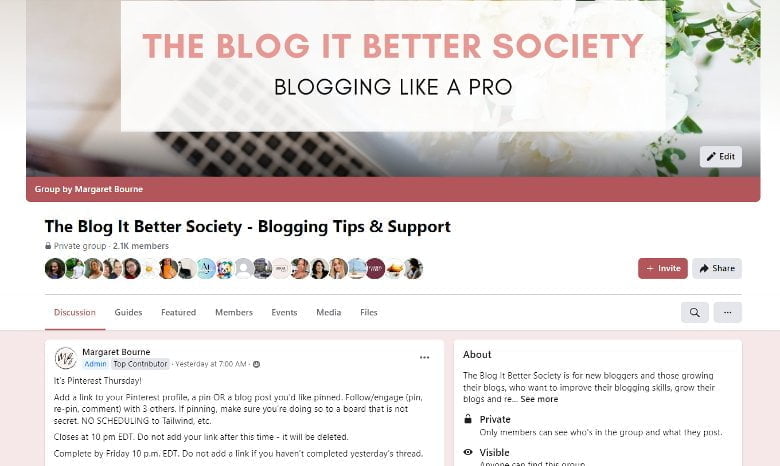
Your own Facebook group gives you a place to connect with readers and share your useful content. If having a community fits your niche and you have time to manage it, you can start a Facebook group. Build it over time, attracting people interested in your topics.
One of the best ways to promote your blog in your group is to share posts that are relevant to what members need right now. Think seasonal topics, common questions or a challenge that keeps coming up in conversations.
For example, before the Fall season begins, I will promote my Fall blog post ideas to inspire my Blog It Better Society members. It’s a timely resource that can give them ideas for their content planning while encouraging visits to my blog.
Here’s what works well:
- Go beyond a simple link. Share a useful tip from the article.
- Explain how the article helps
- Ask a related question to keep the conversation going
Always give members a reason to click and to engage in conversations.
If you’re a new or growing blogger, feel free to join my Facebook group today!
| RELATED: How To Grow Your Facebook Book Into A Successful Community
Goal 3: Build Interest In Your Ideas And Expertise
Some ways to promote your blog help people get to know you before they’re ready to visit your site. When you share useful tips and personal insights around your niche, potential readers gain an understanding of your expertise and whether your blog is worth following.
The platforms below can help you build that interest over time, with relevant links giving people a next step when they want to learn more.
7. How To Promote A Blog For Free Using Instagram
I’ve found some great success with Instagram. It’s one of the ways to promote your blog, share your content, and build interest in your niche expertise.
I use my Instagram at @margaretbournemedia primarily for blog visibility and connecting with people, rather than as a main source of website traffic.
Use your content to help potential readers get to know you, understand what you cover and decide whether they want to check out your blog.
Help People Discover Your Brand On Instagram
Here’s something you need to know: when you promote blog posts on your eligible professional Instagram account, your posts and reels can appear in Google searches.
This gives people another opportunity to discover your content, even if they don’t yet follow you on Instagram.
Eligibility includes having a public professional account, being over 18 and allowing search engine indexing in your Instagram settings.
Use clear descriptions and relevant keywords naturally in your profile and captions. Explain what your content covers so people can quickly decide whether your content is of interest to them.
Someone might discover an Instagram post through Google, explore your profile, then follow a link to your blog. Your profile links give interested people direct access to your blog posts. However, these extra steps mean getting discovered doesn’t always lead to a click-through to your website.
Promoting Your Blog Posts: Links On Instagram
Here’s how to
- Make sure your profile and content reflect your blog’s topics. Personal photos and behind-the-scenes posts can fit too, especially when they help followers get to know you.
- Create a page on your blog with links to the relevant posts you share on Instagram. Here’s an example of mine with blog links posted on Instagram.
- Add that page to your profile links with a clear label. You can also link directly to a specific article when that’s the most useful next step.

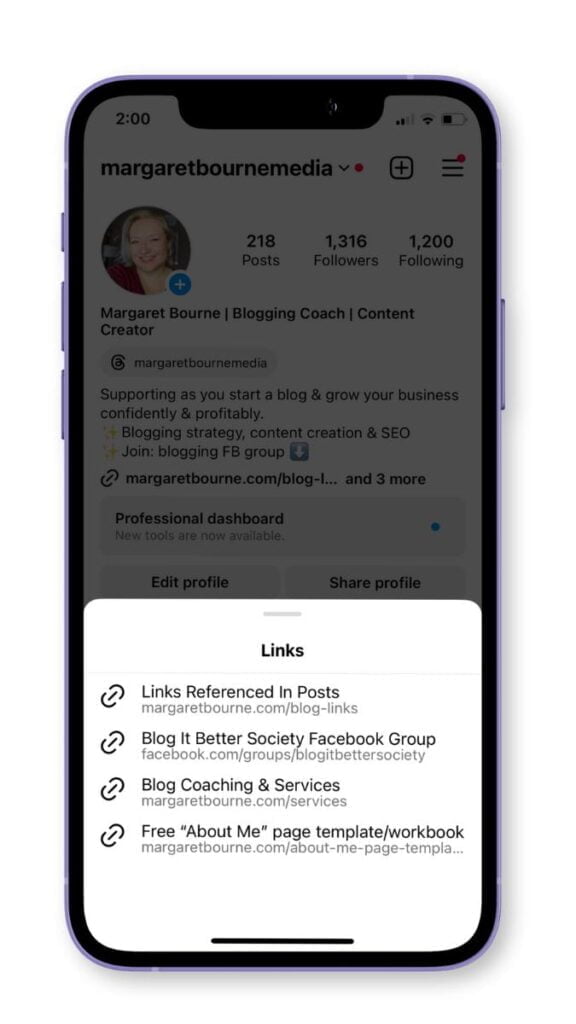
Keep your Blog Links page updated so visitors can easily find the article you’ve mentioned.
4 Ways To Promote Your Blog On Instagram
So, what are the ways to promote your blog on Instagram?
- Posts and captions: Share a relevant image or carousel with useful insights from your article. Include a call-to-action explaining what else readers can find through your profile link. I like to make this stand out with CAPITAL LETTERS.

- Stories: Alert followers to a new or timely blog post with a screenshot or related image. Use the link sticker to send them directly to the article.
- Brief videos in Stories: Share one tip or idea from your blog post, then explain what else readers can find in the full article. Mention this early, as not everybody watches to the end.
- Reels: Take a few points from your blog post and create a short video that answers a question or demonstrates an idea. Give viewers something useful, then invite them to explore the related article through your profile link.
Give people a reason to follow you as well as a reason to visit your blog. Useful content and conversations can build familiarity with your brand, even when someone doesn’t click immediately.
NOTE: Meta has tested clickable caption links with some paying Meta Verified subscribers. Since availability isn’t guaranteed with a subscription, check your account’s current features before paying for this option. Profile links and Stories link stickers continue to be useful free ways to direct readers to your blog.
8. Using Threads To Promote Your Content
Threads is another place to promote your blog, share your perspective on niche topics and have conversations with people interested in your topics. It’s also a great place to build your personal brand and visibility.
Like Instagram, I’d approach Threads as a way to build awareness and demonstrate your expertise, with opportunities to bring interested readers back to your site.
You can find me there at @margaretbournemedia.
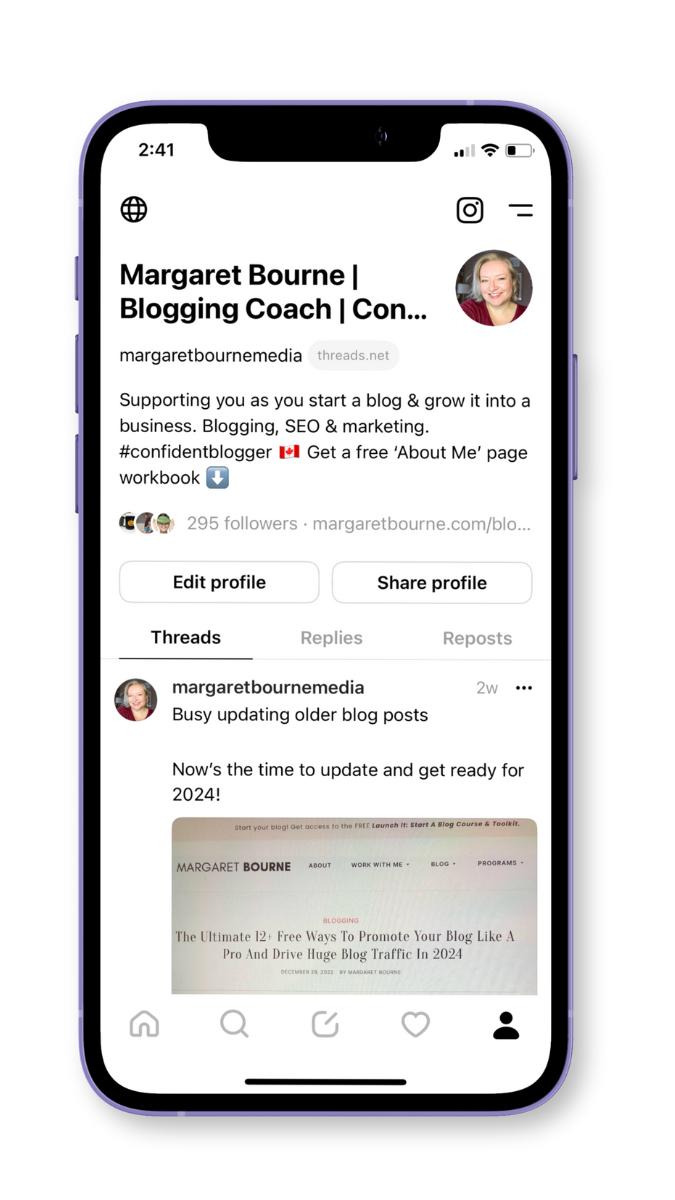
You can include clickable links directly in Threads posts. This makes it making it convenient to share a relevant article during a conversation. Add your blog or a useful starting-point resource to your profile links too.
Don’t go overboard on links. In Threads, this ends up looking spammy. Give people a reason to follow you through your ideas, experience and helpful responses.
If you’re going to share a blog post, be smart about the caption that includes your link. Give people a useful insight and a reason to click, rather than just posting the title and URL.
Here are a few ways to use Threads:
- Share a practical tip from your blog post, then link to the article for more detail
- Post a personal observation or opinion related to a topic you cover
- Ask a relevant question and participate in the replies — engage others
- Join other people’s conversations when you have something useful to contribute
Experiment with different ways to promote blog posts, then check whether those conversations lead to website visits. Building connections can take time, and a popular post won’t necessarily generate lots of clicks.
9. Get Free Traffic To Your Blog With TikTok
TikTok isn’t for everybody – the audience is mostly younger (Millennials, Gen-Z and younger), and certain niches work better than others.
However, it’s on my list of ways to promote your blog.
The format can help you build your personal brand and attract people who want to explore more of your work, including your blog.
Think of TikTok as another way to build awareness and demonstrate your expertise. Website visits can follow, but video views alone don’t guarantee blog traffic.
You’ll need to hook your audience early, ideally in the first few seconds. Start with a question, problem or useful insight that makes someone want to keep watching.
Do some storytelling, give context and show one way to solve the problem. You can repurpose ideas from your blog posts into:
- A quick tutorial or demonstration
- A common mistake and how to avoid it
- A personal experience with a useful lesson
- An answer to a question your readers often ask
In your video, when you promote blog posts, explain what viewers will find in the full article. A checklist, more examples or detailed instructions can give them a reason to visit.
Add your blog URL to your profile’s website field if your account is eligible.
PRO TIP: Caption your videos to make them more accessible and easier to follow, including for people watching without sound.
10. Promote Your Blog Content On LinkedIn
If you have a business-to-business (B2B) blog, LinkedIn is one of the free places to share blog posts. This is where you promote blog posts that are helpful to professionals, business owners or people working in your field.
Sharing posts on LinkedIn helps demonstrate your expertise and give interested readers a reason to visit your site.
Choose topics that fit the audience you’re building on LinkedIn. Business, careers, productivity and professional development are natural starting points, but other topics can work when there’s a relevant connection.
For example, a parenting blogger could share advice on managing school holidays while working from home. This topic is relatable to working parents, making the article useful to a professional audience.
When you promote your blog posts on LinkedIn, add your own comments and engage your readers with a question. Then include the link for readers who want more detail.
Use a LinkedIn newsletter to build regular readership
If you have a LinkedIn account in good standing, you can use a LinkedIn newsletter to promote your blog. For most success, if your topic is professional and you write consistently, the newsletter route is a smart way to promote blog posts.
Like with regular email newsletters, publish a useful perspective, lesson or example in each edition. Add a link to a related blog post, giving readers more to delve into.
BONUS TIP: Since your LinkedIn newsletter subscribers are separate from your own email list, you can invite them to join. Just don’t duplicate the content. Keep it fresh.
11. Use X To Promote Your Blog
Is X still one of the top ways to promote your blog? For some bloggers it might be, but for most it’s a place to build your position as a niche expert.
If your audience is active on X, you can connect with people interested in your niche and give them a reason to explore your blog.
Build your niche expert profile by:
- Sharing useful tips and perspectives on topics you know well
- Following others in your niche and actively engaging with them
- Creating a thread with insights which leads to a final post that includes a link to your full post
Before you fully start promoting your blog on X, test it out to see if you get any traction. It may be that your niche audience isn’t interested in click-throughs to your website when using X.
PRO TIPS: Repurpose your blog post content for X threads. Use your AI chatbot to help you quickly create thread content for X based on your blog posts.
12. Promote Your Blog On Your Blog’s Facebook Page
Your blog’s Facebook page is another place to promote blog posts and build your blog’s brand awareness.
You can promote blog posts by sharing a link with a short introduction, subject to any link limits on your Page.
What I like to add is a useful insight or personal observation. Sometimes I’ll include a relevant question to encourage the reader to check out the post. Here’s an example of one of my posts with keyword-optimized commentary in the caption:
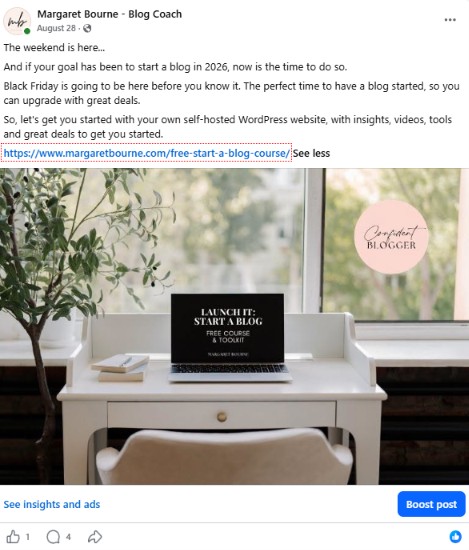
Want to go beyond a simple static blog post image and caption? Repurpose a blog post into a video with a call-to-action to read more on your website.
Treat your Facebook page primarily as a place to build familiarity with your blog brand and to connect with readers.
It’s important to know that not every follower will see every update. As well, reactions don’t necessarily lead to website visits. Use the analytics to check which posts bring interested readers to your site before deciding how much time to spend on the platform.
In addition to this, if your goal isn’t clicks, but clients, an active, content-rich Facebook page may be an important part of the customer journey. Keep your Facebook page active if this is the case.
Pin Your Top Blog Posts To Your Facebook Page
Have really juicy blog posts that get lots of traffic organically? You can pin them to your Facebook page.
These pinned posts get ongoing visibility whenever somebody visits your Facebook page.
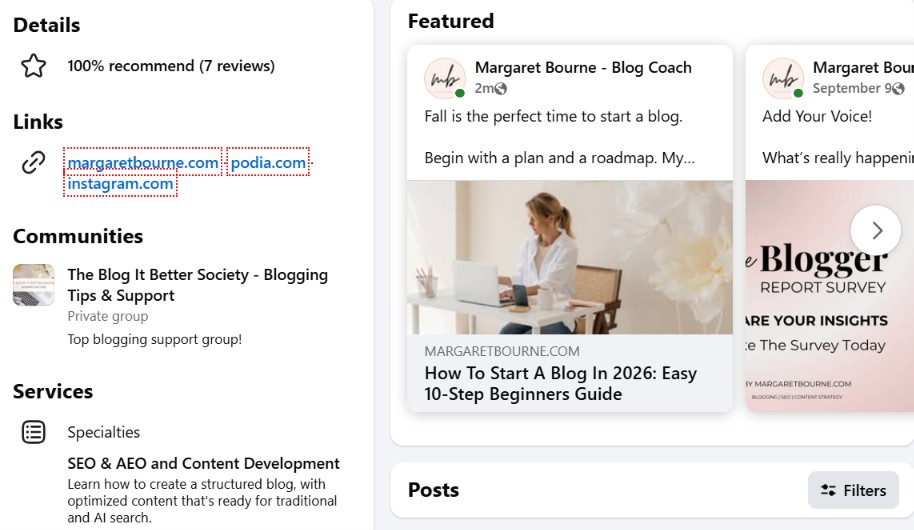
NOTE: Meta is testing monthly limits on external links for some Facebook Pages, with higher allowances available through certain paid subscriptions. Check for notices on your Page before planning regular link posts. Putting a link in a comment may also count toward the limit.
PRO TIP: You can also post to your personal timeline among your family and friends. This is an easy way, but don’t overwhelm them with ALL of your posts. Share only the ones you think they would really find interesting and useful.
13. Use Substack To Reach New Readers And Promote Your Blog
Another place to introduce people to your blog content is Substack. It’s a publishing platform where you can write articles, send them as email newsletters and engage with readers.
People can follow your activity or subscribe to your publication, and you can offer free content, paid subscriptions or both. Like Threads or X, it also has Notes. This is a social feed for short thoughts, links and conversations.
While some are creating a complete blogging ecosystem in Substack, I’m using it to grow awareness and drive traffic back to my main site. I promote blog posts within personal, opinion-based posts on Substack, giving readers a different perspective on the blogging topics I cover here.
Here’s an example of one of my Substack articles that supports blog posts on this site:
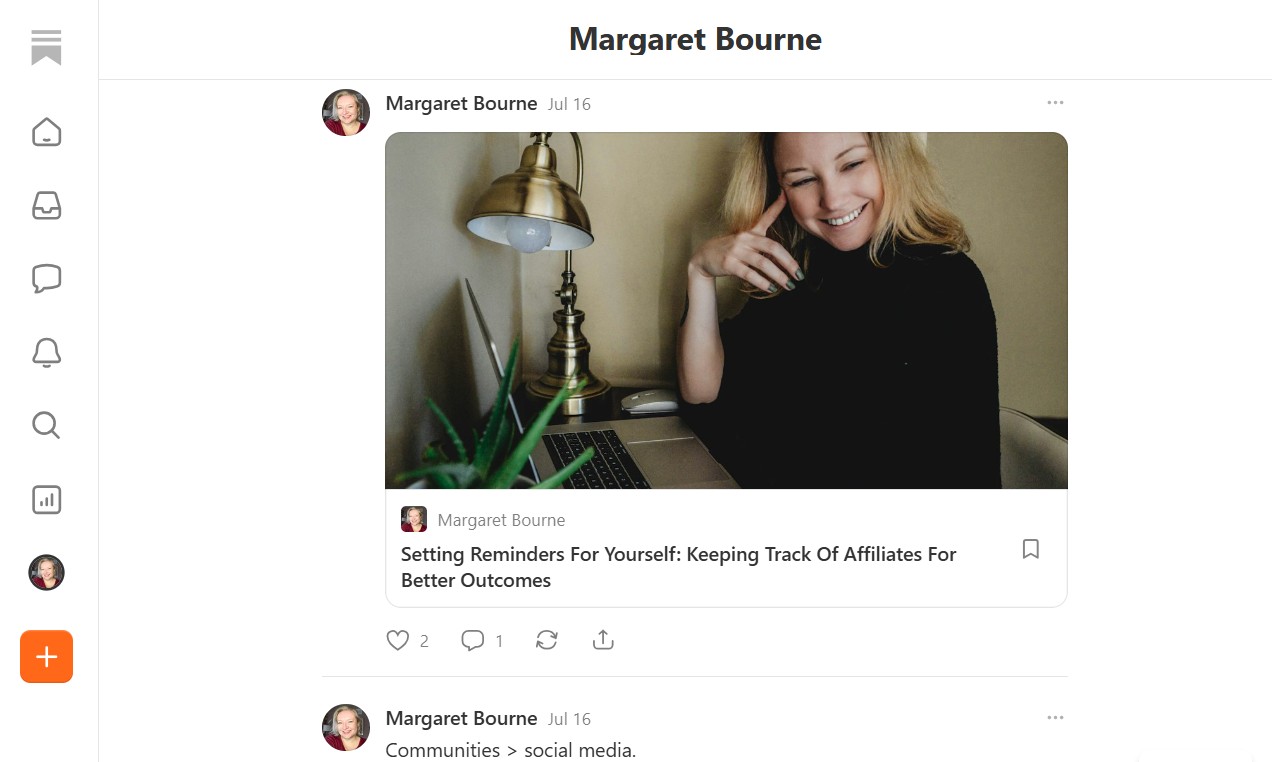
With this approach, you’re not recreating your blog on Substack. Rather, you’re sharing specific insights, opinions, or experiences on a topic, then linking to a relevant blog post. The links pointing back to your main website are what drive traffic.
Here are a few ways to use Substack:
- Publish a personal take. What have you tried, noticed or changed your mind about? Share your perspective, and promote blog posts on your main site that are relevant to the topic.
- Use Notes. Share a quick tip, observation or question that starts a conversation. Include a blog post link when it adds something useful.
- Connect with other writers. Read their work, leave thoughtful comments and join conversations related to your niche.
What I don’t recommend is to use every post as a teaser with a link. Give people something worthwhile to read on Substack itself. Otherwise, there’s little reason to follow you there.
PRO TIP: Pair a personal Substack post with a post on your blog. Share what you learned from an experience on Substack, then direct readers to the step-by-step guide on your site.
14. Promote Your Blog On Medium
Medium is a publishing platform where you can share articles and reach readers interested in your topics.
Like with Substack articles, you can publish useful articles that stand on their own, adding links to related blog posts when they offer more detail. However, with the Medium audience, avoid posting teasers that require readers to leave the site to finish reading.
To avoid duplicate blog content, write original blog articles on Medium. Add relevant links back to your blog. Your audience also expects your own insights and examples.
A good Medium strategy is to use it as a way to build interest in your expertise, then monitor to see if it brings readers to your website.
I’ve dabbled in Medium, but it’s like running a second blog. It’s not for everybody, and it lacks the strong community/newsletter aspect found in Substack.
NOTE: An interesting thing about Medium is that their articles do rank in search results when they’re optimized for SEO because of the platform’s higher domain authority. It might be a good place for beginner bloggers to blog alongside their own blog site.
Goal 4: Reach People Through Communities And Engagement
Some ways to promote your blog start with joining communities and contributing to other people’s platforms.
Sharing useful answers and building relationships can introduce your work to readers who might not otherwise find it.
15. Promoting Your Blog Posts In Facebook Groups Other Than Your Own
Participating in relevant Facebook groups helps you connect with people who are more likely to be interested in your blog content. The key is to participate in the community and promote your blog posts when they’re useful and permitted.
When it comes to other Facebook groups, there are a few rules that apply to how you promote your blog posts.
- Follow the group rules. Share your links when you’re invited to do so by the group admin. In some cases, some groups have daily “threads” that are specific to blog post promotion (e.g., click-through posts, sharing the post on social media, Pinterest pin promotion, etc.)
- Reciprocate! Don’t just drop a link and “run”. You may get booted out of the group if they’re strict about reciprocation. Be nice and give the same attention to others’ posts, and you’ll get the same back.
- Be relevant. Share blog posts that will appeal the most to the group’s members.
- Choose Facebook groups carefully. Don’t go overboard on how many groups you participate in each day. Focus on those that your potential readers use, and participate in a manageable number.
I also recommend that you prioritize interested readers over reciprocal clicks. Visiting other bloggers’ posts just to receive visits in return can take time without building an audience that wants your content.
JOIN my Facebook group for new and growing bloggers: The Blog It Better Society! Also check out my favourite Facebook group for bloggers.
| RELATED: 5 Smart Ways To Give Your Blog A Quick Increase In Traffic
16. Use Reddit To Share Your Expertise
I have a love-hate relationship with Reddit. It’s a platform where useful conversations are happening, but you can’t just drop your blog links and run. Building credibility takes time.
Here’s how you promote your blog on Reddit:
- Find communities, called subreddits, related to your niche.
- Read the discussions, answer questions and share your experience where it can help.
- Give helpful answers. If a related blog post includes useful details and links are permitted, share it and be clear that you wrote it.
Always check each subreddit’s rules before sharing your own content. Some allow relevant links, while others do not permit self-promotion, even if you’ve been an active member. Reddit in general does not permit spammy link-dropping behaviour.
Think of Reddit as a place to build trust and understand your audience. It can be one of the ways to promote your blog, but website visits will usually happen when you’re successfully building your blog/personal brand through consistent, helpful participation
NOTE: Consider your audience. Reddit leans more toward a younger, male audience. If yours is women, it’s less likely they are spending time on Reddit. Of women spending time on Reddit, they are Millennials and Gen Z.
17. Use Quora To Promote Your Blog For Free
Quora is a site dedicated to questions. On all topics! Like Reddit, it’s a place where you can share your knowledge and help people looking for information.
It’s worthwhile exploring if you have a niche blog and can offer useful answers based on your experience.
The key is to answer the question fully on Quora. If a related blog post offers additional detail, include a link and note that it’s your content.
In my opinion, Quora is optional. Test it rather than make it your main focus. Start with a few relevant questions and see whether your answers bring interested readers to your blog before dedicating more time to it.
18. Get Blog Traffic Through Forums
Forums have been around for many years, and niche communities can be useful places to connect with people interested in your blog topics.
Do your research before joining. Check to see if the forum is active with recent discussions. An active forum with the right audience is more useful than a large one with little relevant conversation.
Like Reddit and Quora, some forums are strict about sharing links. Read the forum’s rules before sharing links. Some permit relevant blog posts in discussions, while others limit promotion to designated threads or your profile.
Answer questions and share your experience within the conversation. When it’s permitted, link to a blog post that adds useful detail. Choose one or two communities you can participate in regularly, and see whether they bring interested readers to your blog.
19. Write Blog Posts For Other Blogs
Guest posting is one of the popular ways to promote your blog while introducing your expertise to a new audience.
Here’s how it works:
- Pitch a blog that has an audience you want to attract. It can be a blog of similar size to yours, or one with a slightly larger audience. These are easier to pitch.
- Contribute an original blog post. Include a few links within the post and make sure your author bio is included.
- Promote the post on each other’s social platforms. This helps extend your blog’s visibility beyond just the blog website itself.
Before pitching, read a few posts and check the guest contribution guidelines. Suggest a topic that fits their audience and adds something they haven’t already covered.
Ask whether you can include a link to your blog in your author bio or a relevant resource within the article. Let the host’s guidelines guide your approach.
Create quality blog content when guest posting! This is your opportunity to impress a new audience and entice them to check your blog out further.
NOTE: If you can’t get a backlink, make sure your blog’s name and your name are included correctly. An unlinked mention can still introduce readers to your blog, and research from Ahrefs suggests that brand mentions across the web are associated with greater visibility in AI search. A backlink gives readers a direct route to your site, but a relevant mention can still be worthwhile.
20. Get Featured In Interviews And Expert Roundups
Interviews, expert roundups and quotes in articles or newsletters are other ways to promote your blog and share your expertise.
What you want to look for is bloggers, journalists and newsletter writers who cover topics you know well. Respond to requests for contributors, or suggest a specific insight that would be useful to their readers.
A few places to find opportunities:
- Existing list of contacts that you have. Put the word out that you’re open to opportunities.
- Threads, Substack and X posts with interview opportunities.
- Facebook groups and mastermind communities. If you’re part of niche groups with other bloggers, check to see if there are collaboration opportunities. Signal your interest with a post or response to somebody’s request.
- Old roundup posts in need of an update. Found an old list with people referenced who are no longer in that niche? Reach out to the blog owner with your content ready for copying and pasting into the existing article.
Always give them something worth quoting. A practical tip, a lesson from your experience or findings from your own research can make your contribution stand out. Answer the question directly and meet their deadline.
Provide your name, a short description of your expertise and your blog URL. You can suggest a relevant blog post as an additional resource, although the publisher decides whether to include a link.
Once the feature is published, share it with your audience and thank the person who included you. It’s also an opportunity to start building a professional relationship that could lead to future collaborations.
| READ MORE: Why It’s Important To Work On Your Personal Branding As A Blogger
21. Be A Guest On A Podcast
Being a podcast guest gives you an opportunity to share your expertise and introduce your blog to a new audience. Look for podcast shows that cover your niche or a related niche with an audience that would find your content useful.
Get started by building relationships with bloggers who have podcasts, or pitch a host directly. Listen to a few episodes first. Then suggest a specific topic and explain what unique insights you can share that their audience will find useful.
Make it easy for listeners to take the next step. Ask the host whether you can mention a relevant blog post or free resource during the interview and include its link in the show notes.
Have a short bio ready that explains who you help and what you know well. Once the episode is published, share it with your audience to help more people discover the conversation.
Here’s an example of a podcast that I was on, talking about optimizing blog posts for podcast episodes:
22. Promote Your Blogs And Key Pages In Your Email Signature
Finally, in this list of ways to promote your blog, let’s not forget your email signature. This works well, especially if you regularly email brands, clients or others interested in your expertise.
Include a link to a cornerstone blog post, a useful free resource or a recent post that’s relevant to the people you’re contacting. Give them a reason to click with a descriptive title, such as “Planning your blog content? Get my free content calendar.”
Less is more. Choose one featured link so it’s easy to spot. Review it occasionally to make sure the content still supports what you want to be known for.
Promotion Doesn’t Always Lead To Traffic
You can implement a number of ways to promote your blog. However, there are a few things to note:
- Quick to implement doesn’t mean quick to produce meaningful traffic. Adding an email signature takes minutes, but its reach is limited.
- A direct link doesn’t guarantee clicks. A Facebook post can contain a link and still generate little interest.
- Awareness has value when there’s a next step. Give interested people a relevant article, newsletter signup or resource to explore.
- A slower channel can become a recurring source of visitors. Evaluate the accumulated results alongside the time required to maintain it.
- An established audience changes the timeline. A newsletter can send visitors today; building that subscriber base takes longer.
The goal is growth over time. Each activity adds an extra layer of visibility and awareness for your blog brand. Some may not drive clicks to your site, but may improve your visibility in AI searches.
This is why it’s important to think about your overall strategy instead of tactics when it comes to selecting ways to promote your blog.
Promote Blog Posts In Places That Work For Your Audience And Niche
These are just some of the ways to promote your blog. There may be others that work for you!
There are also SEO, networking, and other activities for promoting your content.
However, when you publish a new post, these are some of the best places to promote your blog and your blog’s fresh content.
Now you know how to get blog traffic for free. Start experimenting and see what works for you.
Don’t forget that you can do the same thing when you update your old blog posts!
QUESTION: What ways do you use to promote your blog?
Like this post? Share it on Pinterest – thank you!
Want more blogging advice from Margaret?
Add MargaretBourne.com as a Preferred Source so Google can highlight more of my blogging advice for you in Search, AI Overviews and AI Mode.







Does Mix still work right now? I tried to sign in but did not work… Great Content by the way
Yes, it still does. I was able to log in without issues. It’s never achieved the same level of traffic as StumbleUpon, but it’s still a good place to add your content.
It is very time-consuming to try to be on every single social platform. I’m sticking to 2 of them right now. Thanks for the list.
Absolutely choose the ones that work for you the best! These are just suggestions to try out. Your audience may not be on some of these.
Definitely so much I haven’t tapped into yet! Thanks for all the tips on promoting a blog.
All good to explore and try out to update your strategy when the time comes.
Excellent suggestions,I look forward to using them in growing my blog.Thaks Margaret.
You’re welcome!
First time hearing about Blog Post Vote Up! I’m definitely going to try that one, Mix and Blogarama for my cannabis & self-care blog. Was considering Reddit but my audience is mostly women so I’m not going to prioritize that one.
MaryZeal.com | Where Cannabis is Self-Care
It’s sprinkling the links in every place where people are possibly seeing it! Make sure your titles are enticing for the click.
These are awesome tips! Thank you so much!
You are most welcome!
This is a great post, thank you for all of the tips! I am definitely not promoting all of the social media platforms as much as I could be.
Me too! There are so many others out there.
Great and handy tips. I’m currently learning how to use Pinterest to promote my blog
What?! I didn’t know about half of these! Thank you for this valuable info!
You are most welcome!
I’ve been really trying to learn more about how to use Pinterest and I think it’s slowly helping. Just going to try to be consistent and never stop learning.
Keep at it! Consistency is key!
Excellent suggestions Margaret… but a little overwhelming from my perspective. From your experience, how would you prioritize these (if that’s possible) for bloggers with limited time?
I know this is probably a super-hard question to answer, since we need to be in as many places as we can…. but for me I’d need to choose my battles!
Most definitely would prioritize depending on what your audience is using. Some of these channels won’t work for you but might work for others. And if you are a parent, certain ones on the list aren’t feasible with the time you need to dedicate to get them going (e.g., Medium or Reddit)
Great tips! Thank you for sharing. I am slowly building my blog and am so new to all of it 🙂
This is the perfect time for you to test out what works with your audience and create a promotion strategy. Hope these help!