
You’ve started your email newsletter with an email marketing platform, but how do you grow your email list for your blog? One of your key goals is to increase newsletter subscribers. In this post, you’ll learn how to build an email list with five smart strategies that work.
Developing your email newsletter is essential: it’s a powerful marketing tool for your blog or online business. With it, you can build your blog brand, personal brand, and online business.
Offering a valuable free lead magnet is one way to entice subscribers to join your weekly newsletter. However, there are other strategies to employ.
We’ll look at how to create an awesome lead magnet that’s relevant to your readers.
We’ll go beyond the freebie and look at several other key ways to grow your email list. Let’s delve into important email marketing strategies for bloggers when it comes to list growth.

DISCLOSURE: This post contains affiliate links, meaning if you click on a product or service, and decide to purchase it, I may receive a commission at no extra cost to you. All recommended products and services are based on my positive experience with them. For more information, please read my Disclaimer.
Bookmark this post for future reference on Pinterest
Why You Need An Email Newsletter List For Your Blog
There are many very good reasons why you need to grow newsletter subscribers. Optinmonster’s 2024 survey found that 55% of people surveyed say they check their emails first in the morning, not social media or other platforms.
You want them to WANT to read what you have to say on a weekly or bi-weekly basis. For this, you’ll need to attract them to you first!
The average email list growth rate across various industries is approximately 2.5% per month. But how do you get the right subscribers on your list in the first place?
If You’re Just Starting Your Email Newsletter List
If you haven’t started your email newsletter list, my full email marketing for bloggers guide takes you through the complete process.
However, here are the essential steps you’ll taking:
- Choose your email platform
- Create one irresistible lead magnet
- Build a simple landing page
- Add opt-in forms in at least two placements
- Create a 3-email welcome sequence
- Promote the lead magnet regularly
In this blog post, we’ll explore some of the key strategies you’ll take to promote and grow your email list.
How To Grow Your Email List: The Psychology Of Sign-Ups
You want to grow newsletter subscribers fast. However, if you don’t have a freebie offer (also called a lead magnet), it’s going to be very difficult to attract people to sign up for a newsletter.
If you’re asking them to give something of value (their email address), do you think they’ll want to get nothing in return?
If that’s the case with your newsletter sign-up form, they will be less likely to sign up.
So you will need to create something to offer.
Once you understand why people sign up, it becomes much easier to use the right strategies to get more qualified subscribers.
How To Increase Newsletter Subscribers from 0 to 550 in 5 months
When I started MargaretBourne.com, I brought over a small group of existing subscribers from Suburban Tourist and wanted to quickly grow from there.
I was starting with a base number of subscribers. However, I wanted to increase newsletter subscribers fast.
Knowing that sometimes people sign up for freebies (lead magnets) and then unfollow immediately, I was aiming for about 100 new subscribers a month. A realistic number for most bloggers!
I did several things that you may want to adopt to grow your email list:
- Created four opt-in lead magnets that I knew my target readers would be most interested in, and that would work with most of my blog posts.
- Added the lead magnets in relevant blog posts, especially ones that had high traffic
- Added a hero lead magnet opt-in on my main Home page and at the bottom in the footer
Using this approach, I ended up boosting my subscriber list by over 550 new subscribers in five months!
Even new bloggers can benefit from following smart strategies for growing their email list. Let’s get started!
| READ: How To Start A Blog And Set It Up To Be A Profitable Business
How To Grow Your Email Subscriber List: 5 Smart Ways
Five creative and strategic ways to increase newsletter subscribers include:
- Create a valuable lead magnet for your subscriber list opt-in
- Participate in bundled promotions
- Build your email list through your Facebook group
- Run a quiz on your blog
- Run a giveaway or contest
We’ll explore these ways to grow your email subscriber list in detail. It’s important to experiment and see what works for your blog.
A/B testing is helpful as you grow your email newsletter list. Test what works and stick with what does. Let’s get started!
1. Create A Compelling, Valuable Lead Magnet For Your Opt-In
Start growing your email list by having something of value to offer your potential subscribers.
One of the most important ways you can grow your email list subscribers is to offer your readers a digital download that solves a big problem. It has to be so enticing that they can’t wait to access it.
Think of a common problem your readers may have. Come up with a solution that helps them transform that pain point into a positive.
For parents, it can be something like a huge list of boredom-buster activities for their kids. For fashion types, a guide to matching clothing items that always stump your readers.
You may have to try out a few different types of lead magnets before you find out what works with your readers.
The best way to do so is to:
- Research your reader’s pain points by seeing what questions they have in relevant Facebook groups.
- Create a few, add them to relevant posts and see which ones are doing well with sign-ups.
If a lead magnet isn’t working, you can remove it from your blog. It adds clutter to otherwise clean blog posts. Use only those that get the best opt-in rates.
| READ MORE: The Best Lead Magnet Ideas For Blogs: Over 50 Ideas For Inspiration
How To Create A Lead Magnet
One of the best tools for creating lead magnets is Canva.
The free version is fine, but the pro version has thousands of pre-made templates for lead magnets.
From workbooks, calendars, to-do checklists and more.
Modify them and print them out as PDFs. You can also create your own freebies, as I did with free Pinterest pin templates.
For Canva templates you create for others to use, you need a Canva pro account.
How To Send Lead Magnets As PDFs
For any lead magnet that can be sent in a PDF format, you’ll need to find a “home” for it first. The easiest way to do so is to host your PDF in a Google Drive.
- Upload your file to Google Drive
- Make the file shareable – with View Only (click the Share)
- Add the link to your automated email
Here’s how it looks in Google Drive:
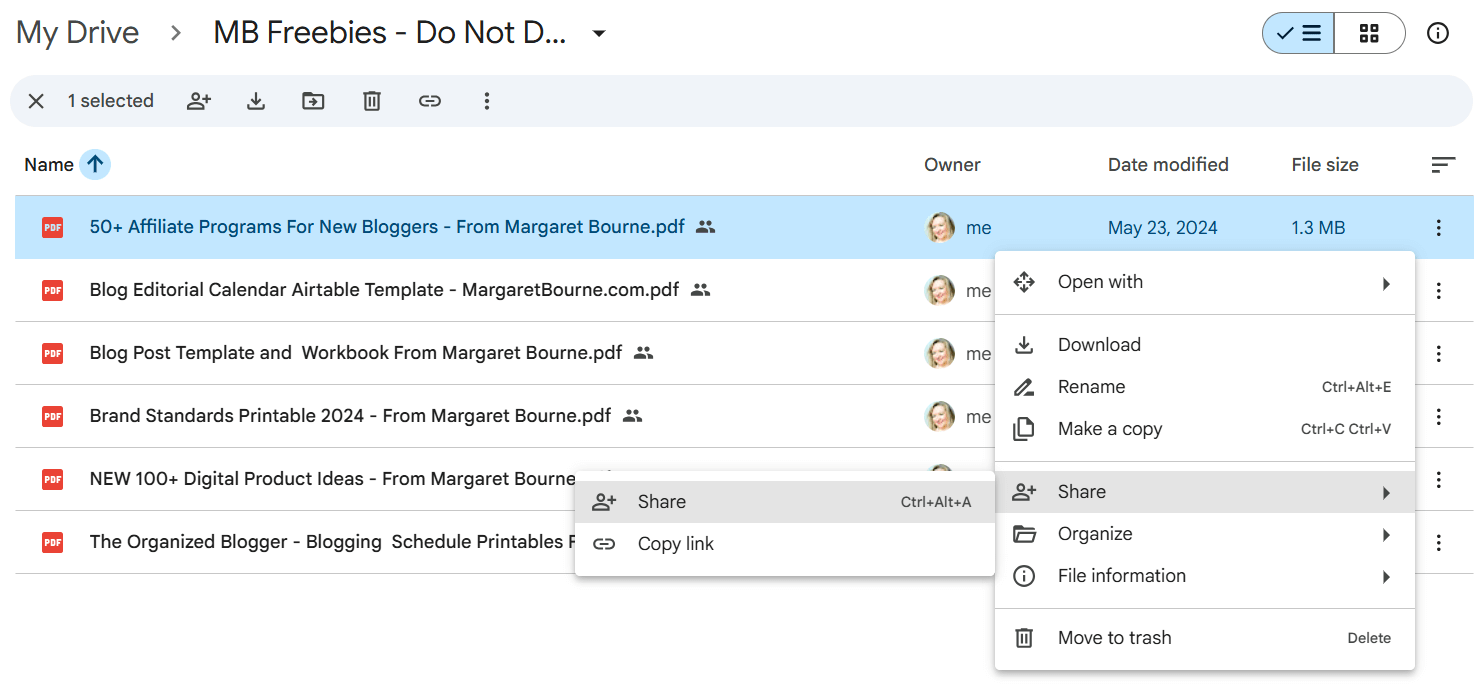
Double-check to make sure the link is working in the automatic email subscribers get when they opt in. This is one step I always do to ensure I’m making a good first impression, right from the start!
Another way to provide a freebie file is through Dropbox and sharing the link.
High-Converting Spots On Your Blog For Your Opt-In Form
The best spots to add your opt-in form on your blog are:
- Above the fold
- Mid-post
- Exit-intent pop-ups (light touch)
- Blog sidebar
- After-content blocks
- Resource library pages
- Landing pages
- Navigation bars
We’ll explore these
Add Your Freebie Opt-in Form To Relevant Blog Posts
The next step in growing your blog email list is to add opt-ins to your relevant blog posts.
I have a free worksheet lead magnet for writing an About Me page, a common problem for bloggers. It’s my freebie for my how to write an About Me page blog post.
However, there are other, somewhat less relevant blog posts that can include this opt-in. The trick is to blend an opt-in into your content so that it makes sense.
So, for example, in my blog post on Starting A Blog, I can include the About Me Page Worksheet opt-in lead magnet in the section that talks about writing one’s About Me page.
Which, by the way, have you updated yours? It’s always good to keep your About Me page up-to-date and relevant. Get my free worksheet below.
See what I did here? I tied in the freebie to the actual content of my post.
Best Spots To Add Your Opt-In Form On Post Posts
For the best conversion, add your opt-in forms in these spots on a blog post:
- Near the top, after the introduction section
- Mid-post
- Conclusion area, with a strong call-to-action
Explore various options: from opt-in forms via your email marketing platform to call-outs you design with links to opt-in form landing pages.
Add A “Hero” Lead Magnet Opt-In To Your Static Pages
If you have a static home page, as I do, or an About, Services/Products, or other static pages that work with having an opt-in lead magnet, this is where you can add one.
For example, I have my opt-in form for writing your About Me page on my home page in the middle section, and in the footer.
You may have to test out which lead magnet gets the most interest from your key audience. Sometimes you may need to change it completely.
For example, I may want to change mine from an About Me page worksheet to a free start-a-blog course and toolkit that I offer.
Add Your Newsletter Opt-in Form To The Blog Sidebar
You can also grow newsletter subscribers through prominent embedded forms in the sidebar.
You will need to create your opt-in form on your email marketing platform first. Here’s how to add it to your site:
- Go to Appearance in your WordPress dashboard
- Click Widgets
- Click Custom HTML (or if you have old school widgets, something to this effect)
- Add your opt-in form’s HTML
However, I usually stay clear of this to avoid slowing down my site. It can also make the sidebar look cluttered.
However, if you do add a sign-up form, it should be short and sweet. You’ll need to carefully edit your words to be concise yet enticing. When you create the embedded form, resize it to fit your sidebar’s maximum pixel width.
PRO TIP: Instead of promoting your opt-in form on your sidebar, promote a landing page for it instead. This improves the loading speed issue that opt-in forms inevitably can cause.
Increase Newsletter Subscribers Through Pop-up Opt-In Forms
Pop-ups may capture attention, but they often hurt user experience, slow down site speed, and can frustrate readers. This makes them a less effective long-term strategy for building an engaged email list.
If you still want to use a pop-up for your opt-in, consider having it engage your readers as they are leaving your page.
Many email marketing platforms have this feature available to users, and it’s the least obtrusive way to create a call-to-action to subscribe.
Grow Newsletter Subscribers Fast With Freebie Opt-Ins In Headers
When trying to grow their email newsletter list faster, some bloggers add a banner-like header for their lead magnet opt-in.
This is the first thing somebody sees when they visit your post or page. It’s a smart strategy, however, I recommend you keep it small and tasteful.
Your reader hasn’t had a chance to engage with your awesome content yet. So, how do they know if it’s worthwhile to sign up to get anything from you in their precious inbox?
A less obtrusive way to alert a reader to a lead magnet opt-in is in a sticky top header announcement bar (like I did with mine).
If your theme allows you to customize it, you can direct readers to a stand-alone opt-in lead page.
Here’s an example of a sticky header announcement that you can modify:
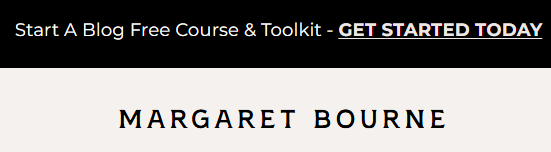
You can also use third-party plugins to create similar header announcement sections to attract readers to your lead magnet opt-in.
Grow Your Blog Email List By Promoting Your Lead Magnets Regularly
To grow newsletter subscribers, you need to do more than just place a form on your site. Other ways include:
- On relevant promotion threads in Facebook groups
- Your Facebook page
- X (formerly Twitter) with a link to a landing page
- Pinterest (add a mention of your lead magnet on your pin designs)
- Your Instagram posts and stories
Bottom line: A compelling lead magnet is the fastest way to grow newsletter subscribers as a beginner blogger.
2. How To Increase Email Subscribers By Participating In Bundles
Bundles are themed free or paid packages, organized by one person, who invites others with digital products to submit something relevant to be included in them.
Participating in bundles is a fast way to increase newsletter subscribers.
Here’s how it works:
- You provide a digital product for a bundle.
- The organizer and participating product providers promote the bundle to their audiences.
- When somebody joins or purchases a bundle, they have the option of signing up for individual products in the bundle.
- If they sign up to get your digital product, they become a newsletter subscriber.
You’re bound to have seen bundles being promoted if you’re signed up for newsletters for those who are participating in them or are affiliates for them.
You can find bundles by following other top bloggers in your niche on social media and via their newsletters. Many of them promote bundles they are involved in, and that’s how you can learn about them.
So, how do you tap into bundles to grow newsletter subscribers?
Here’s what you’re going to need to do:
- Have a digital product that’s relevant to the bundle theme
- Submit the digital product and have it accepted as part of the bundle
- Ensure that when somebody signs up to get your digital product within that bundle, they share their first name and email address.
- Ensure that your email marketing platform has a brief welcome email series to introduce you and what you do.
That’s it!
You can grow anywhere between 50 to 1000+ new subscribers, depending on the popularity of the bundle.
PRO TIP: Free bundles get way more sign-ups. However, you can anticipate that a good chunk of those who are being added to your subscriber list are “freebie” hunters. Ultimately, they may not appreciate emails from you where you sell your digital products and will unsubscribe. This is OK because, ultimately, you want potential customers on your email subscriber list.
| RELATED: A Guide To Creating And Selling Digital Products On Your Blog

3. Build Your Email List Via Your Facebook Group
When you have a Facebook group for your blog or business, leverage it to grow your email subscriber list.
Here’s how you do it:
- Make sure your Facebook group is private.
- For new applicants, give them the option to add their email address to your newsletter. This is important!
- Capture the emails manually and record them in a CSV file via Google Sheets.
- Upload the CSV file to your email subscriber list.
Here’s one of the questions I ask new group applicants before accepting them. They have the option of providing me with their email address.

Alternatively, you can use an automated email collector such as Group Leads to generate email lists.
| RELATED: How To Start A Facebook Group To Boost Your Blog Or Business
PRO TIP: Did you know that you can use your automatic thank-you page when somebody subscribes to your newsletter to promote your Facebook group? It’s a fast way to grow your Facebook group.
4. Run A Quiz On Your Blog
Adding quizzes to your blog is an excellent way to not only make it engaging for readers but also build your newsletter list.
Consider adding a pop-up quiz or an embedded one that works well on your high-traffic-generating blog content.
Determine your busiest months traffic-wise and use a tool such as Interact Quiz Maker to easily add new subscribers to your email list.
PRO TIP: Combine your Interact Quiz with a freebie offer, and you’re bound to get people signing up. Check out examples of quizzes here.
5. Co-promote With Other Bloggers In Similar Niches
One of the easiest and smartest ways to build an email list is to collaborate with blogger friends, leveraging their audiences.
Here’s how it works:
- Reach out to your blogger friends in similar niches
- Propose an email newsletter promotion swap: they promote your free offer, while you promote theirs on your newsletter.
- Decide on the format you will both use: full email promo, or featured offer call-out
- Use a landing page link for your opt-in promos
You can take it one step further and with social media promos (e.g. in Facebook groups, Instagram, Threads, etc.).
NOTE: It’s best to promote your BEST free lead-in offer. Make sure when pitching that it’s not something that your blogger friend is already promoting. It should also be something that’s relevant to BOTH of your audiences. This strategy works best when working with a blogger in a niche that’s a specialized niche within yours (e.g. parenting blogger, partnering with a family travel blogger). This helps you increase newsletter subscribers from a fresh but interested audience.
What About Contests & Giveaways?
This is a somewhat outdated way to grow newsletter subscribers, but it deserves an honourable mention. There are many widgets and tools for running giveaways or contests that have the option to ask people for email addresses.
This is a method that some people like to use. I don’t prefer it as much as it attracts “freebie hunters” who like to win things.
PRO TIP: Use a tool such as SweepWidget to run your contest. It’s one that offers many different ways to generate followers, including email subscribers.
Increase Newsletter Subscribers Using Strong CTA’s
Top marketers understand how to increase newsletter subscribers by using copywriting tricks. Call-to-action prompts (CTA’s) are those you find on the link or button for the opt-in form.
Usually, you find “Subscribe” as the default on email newsletter platforms. However, try alternatives with some A/B testing.
Call to actions for subscribe buttons can be:
- Download Today
- I’m Ready
- Get This Today
- I Need This
- Get Your Free Copy
These tap into emotions like fear of missing out, a sense of urgency, and a desire to solve a problem.
How to Engage With New Email Subscribers
Once someone has signed up for your email newsletter, welcome the subscriber by sending a welcome email. This is your chance to create a first impression. Be authentic, friendly and welcoming.
Also, share with them:
- The free lead magnet – if this is what they signed up to receive
- A thank you for signing up to receive their lead magnet
- A bit about how the lead magnet will help them
- I like to add an extra tip that helps them
- What they can expect now that they’re part of my newsletter community
The welcome email is also a great opportunity to promote:
- Your Facebook group or community. Share the link with an invitation to join.
- Featured products or services. Remember to promote your shop.
- Your courses, including free ones. Promote those that feature affiliate links for a win-win situation.
- Your social media accounts. If your goal is to grow your followers.
Finally, create a weekly email schedule with valuable content – tips, news, trends, deals – to keep your subscribers! It’s easier to increase newsletter subscribers, but harder to maintain them on your list.
Welcome emails can be a powerful marketing tool for your blog or business. You’ll want to build an email list sooner rather than later!
Best Free Email Marketing Tools For Bloggers: Reputable Platforms
What are the right tools to grow newsletter subscribers? To build an email list for your blog, you first need an easy-to-use email marketing platform.
Look for affordable email platforms to start. There are a few that are free for up to 10,000 subscribers, with some limitations.
MailChimp is one that’s often the “standard” that you see partnered with themes. However, I find it difficult to manage and figure out if you’re new to email marketing.
I’ve been using MailerLite for several years, and like its many features. It’s free for up to 500 subscribers. MailerLite makes it easy to add automations and to create beautiful newsletters. After you reach 500, the cost is very reasonable in comparison to others.
Another one that has free options is Kit, with up to 10000 subscribers, but only one basic visual automation and 1 email sequence.
All of these can help you grow your email list via your blog.
NOTE: Flodesk is another good email marketing platform that helps you build an email list.
How To Grow Your Email List Summarized
To wrap it all up, here’s how to grow an email subscriber list:
Via Your Freebie
- Sign up for an email marketing platform like MailerLite or Kit
- Create a valuable freebie download that solves a reader’s pain point
- Add the freebie opt-in form to relevant blog posts
- Add it also to any relevant static pages, like your home page
- Include it in the header, sidebar or pop-up
- Promote your opt-in posts/landing pages on external sites/social media
- Keep creating great content in your weekly emails
And other key methods for growing your email subscriber list:
- Participating in bundles
- Using your private Facebook group membership, questions
- Running a quiz on your site
- Collaborating with other bloggers
- Contests and giveaways
You’ll start seeing your email newsletter grow over time. Give yourself small, realistic goals at first. Once you start getting more blog traffic, you’ll find your email list grows faster, too!
Next step, learn how to keep your readers engaged with these content ideas for weekly newsletters:

QUESTION: What’s your go-to strategy to grow newsletter subscribers?
Bookmark this pin on Pinterest for future reference!
Want more blogging advice from Margaret?
Add MargaretBourne.com as a Preferred Source so Google can highlight more of my blogging advice for you in Search, AI Overviews and AI Mode.







I am so lost when it comes to all of this! More so frustrated! Thanks great article
Hopefully, some of this will help!
I’m SO intimidated by emails lists!! I have no idea what to do or say. I’m very excited to continue learning about email marketing. Thank you so much for including this! I love all of your posts!
It can be overwhelming! There’s much to learn. The best is to sign up to several newsletters to see what kind of style you like. And for attracting people to your newsletter, it’s going to take some testing around.
This was very helpful as I start to build my lead magnets and email list!
Add it to your list of things to learn as you grow your blog!
Developing a freebie is definitely on my to do list. Great tips!
Would love to see what you create!
It’s a big goal but it’s worth it in the long run. You’ll do great! I know it!