Thinking of launching your first digital product, course, or coaching service? Maybe you’re ready to scale your blog into a full-fledged online business. In this updated 2026 Podia review, I’m diving deep into all the latest features, pros and cons, and how this platform works for bloggers, creators, and solopreneurs looking for an all-in-one solution.
There are many course-creation and digital content-selling platforms for bloggers and creators out there.
Which one should you choose? Which one will give you the tools and resources you need to be flexible with monetization?
I did my research, checking out several other platforms before settling on Podia for my CONFIDENT BLOGGER Academy & Resource Collection site.
Podia, in my opinion, is one of the best options for bloggers and new online business owners who want to monetize with courses, digital content and coaching.
In this Podia review, you’ll get the breakdown of the pros and the cons, and a few key considerations so that you can decide if Podia is right for you!

DISCLOSURE: This post contains affiliate links, meaning if you click on a product or service, and decide to purchase it, I may receive a commission at no extra cost to you. All recommended products and services are based on my positive experience with them. For more information, please read my Disclaimer.
Bookmark this pin on Pinterest for future reference.

My Experience Using Podia For My Confident Blogger Academy
I’ve been using Podia since 2021, and I’ve seen how this platform has become an all-in-one digital selling hub for content creators and coaches like me.
Here’s what my Confident Blogger Academy on Podia looks like:

As a blogging coach and digital product creator, I need a strong “base” where I can have all of my content in one spot.
Having the ability to create a separate website from my blog gives me an insurance policy in case something goes wrong with my website.
Read on about Podia and my thoughts on what works great about this digital selling platform.
What Is Podia?
Podia is a course creation and digital selling platform with capabilities to build a customizable storefront. You can also build a blog and manage your email marketing activities.
You can sell a number of types of content on Podia:
- Online courses
- Digital downloads (templates, workbooks, ebooks, images, etc)
- Webinars
- Coaching
- Memberships (community access)
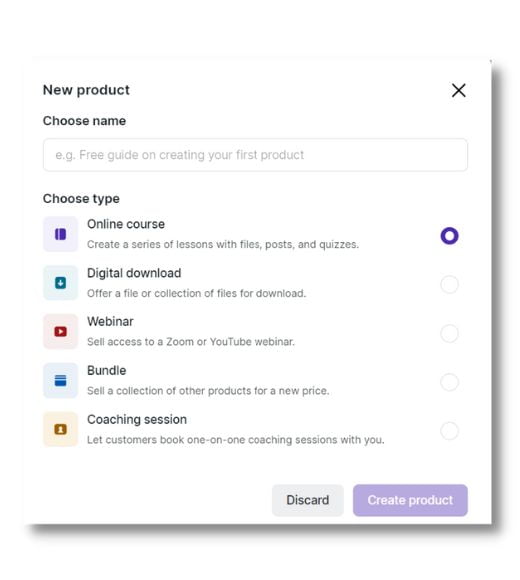
If you’re a low-volume seller, you can also sell physical products on Podia. There are settings in Podia that allow you to collect your customer’s physical addresses so you can send them their product.
With all of these options, Podia should definitely be a top contender for bloggers and solopreneurs who want to take things to the next level faster.
Yes, there’s SendOwl, which is great for beginners who are selling digital content as downloads.
However, if you’re planning on running courses or want to layer in coaching, Podia is your best option.
| RELATED: How To Design And Sell Digital Products On Your Blog
How To Create And Sell Successful Online Courses
Who Is Podia For?
For my fellow bloggers and online entrepreneurs, Podia is a great platform to begin monetizing one’s blog or solopreneur business.
As a digital product-selling platform, it’s ideal for anybody:
- Wanting to build engagement via a community
- Who isn’t savvy with coding: It’s super easy to create your Podia website
- That needs simple features such as coupons, upsells, and launches, but no complicated sales funnels.
So it might be a great option for you if you’re a:
- Blogger selling digital content
- Course instructor
- Coach
- Freelancers who have resources & tools
- Online entrepreneur
Bloggers and businesses in many niches can work with what Podia has to offer.
| Related: How To Make Money As A Blogger: 3 Ways To Get Started
Podia Pricing Structure
For this review, I’m sharing key features that are available starting with the Mover program and the popular Shaker program.
You can try Podia for free, for 30 days. It gives you a taste of what’s possible.
Podia offers two ways to pay:
- monthly at full price
- yearly with an additional % off
For anybody starting out with Podia, the Mover is perfect to start monetizing your blog with courses, downloads, a community (membership) and unlimited coaching.
We’ll delve into all the reasons why it’s a smart investment for anybody desiring to monetize their blog and grow it into an online business.
Check out the Podia pricing plan for the most up-to-date costs.
My Podia Review: The Best Features
What makes Podia so great is that it’s an easy-to-customize digital selling platform. You can create your own branded storefront to sell all of your digital content in one spot.
Some of the best things about Podia are:
- Content that you’re selling is housed on Podia: no need to link to a third-party extension such as Dropbox, etc. This is great for keeping everything organized.
- Automatically deliver the product to your customer, and they can come back to their account in the future (for downloads, or course access).
- You can sell many types of content: courses, digital downloads, memberships (private communities – perfect for coaches), etc.
- No transaction fees with the Shaker plan.
- Start an affiliate program, where others promote your products and help you build your business (with the Shaker program).
- Handles payments via PayPal and Stripe
- Streamlined, single-page checkout experience – no multiple page steps.
- Upsell options at checkout that you can customize with your own messaging
- Many ways to sell – Single product sales, as well as the ability to bundle products together or create memberships with recurring subscriptions
- Global tax support, if you’re collecting taxes
- Unlimited storage for your videos – no need to use a third-party such as YouTube or Vimeo.
- Waitlists, sign-up limits and duration periods – for promotion and creating a sense of urgency for sales
- Community building – when you want to create a private community on a platform that’s not Facebook, etc.
Having used Podia for over fouryears, I’ve used many of the features – and they’re really quite easy to use for course creators!
Latest 2025 Podia Updates You’ll Love
I love how this platform is always evolving and adding new features to make selling easier and better.
Here’s a quick snapshot of what’s new:
- Discussion Forums Within Products: This one is create for courses, where you can interact and answer questions efficiently.
- Specific Taxes For Different Types Of Products: Get the right taxes for digital products, coaching etc.
- Built-in Blogging: Podia now includes a blog editor with SEO tools, post-to-email integration, and even a commenting system (optional).
- Design Upgrades: Add background images to sections on your sales pages for more visual impact and better branding.
- Enhanced Checkout: A better global tax option setup makes selling even smoother. You can now upsell more products easily, making the experience closer to that of competitor Thrivecart than before.
- Free Plan Replaced with 30-Day Free Trial: Gives you full feature access for a month—great for testing it out before committing.
Create A Stunning Website With Podia For Your Business Or Store
You can easily create a website using Podia’s site builder features. Click, adjust and customize to your preferred look and feel.
You don’t need any fancy themes: you build each page easily with premade blocks that are fully customizable.
It takes you less than half a day to build a gorgeous, simple website for your business and your online shop.
Podia’s Email Marketing Tools That Work With Your Products
Podia’s built-in email marketing tool now includes a refreshed editor that lets you build beautiful emails with drag-and-drop blocks.
Plus, with the recent updates, you can send automated campaigns triggered by purchases, page visits, or tags. You can even turn your blog posts into emails with one click!
What I like about the Email Marketing offerings at Podia is that you don’t have to link to an external provider.
Here are the highlights:
- Intuitive email broadcast editor with stunning templates
- Drag & drop editor
- Create automated campaigns for various events, such as product launches, welcome messages, and sales promotions
- Effortlessly segment your audience according to product preferences, subscription status, revenue generation, and more
- Gain valuable insights into your revenue growth through integrated email analytics
You can customize your template with the same customization features you see in the website design editing tools.
Here I was testing things out to see how easy it would be to make my own template. Super simple!
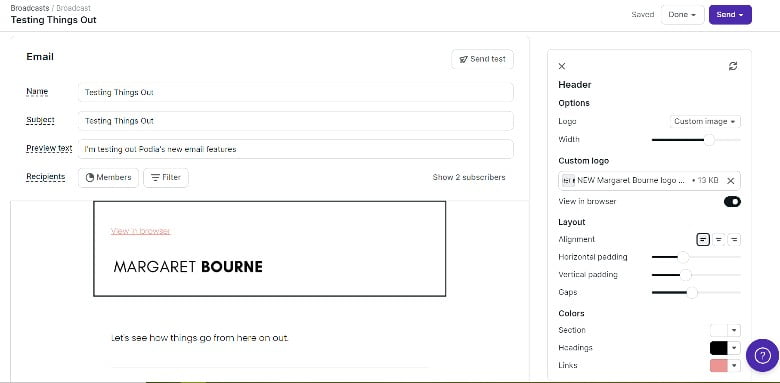
If you’re just starting out with Podia and an email marketing list, it might be a good, streamlined option for you.
But at some point, you may want to move your subscriber list to a third-party email marketing platform if you aren’t planning to use Podia for the long run.
Create a Blog on Podia Without Extra Tools
Podia now lets you publish blog posts right from your dashboard. No WordPress needed!
This is perfect for creators who want to drive traffic to their products with SEO-friendly content. Each post can include images, videos, opt-ins, and even a direct link to your products. It’s ideal for nurturing your audience and building trust before a launch.
If your goal is to keep things easy and in one place, this is an excellent option.
PRO TIP: It’s always important to note that a self-hosted WordPress site is encouraged for SEO power, customization and flexibility. If, for any reason, Podia decides to close down, you still have your own website in place. A smart recommendation is to have a sub-blog on Podia that dovetails off of your self-hosted website/blog.
How to Create Online Courses on Podia (Step-by-Step)
One of the key reasons why I chose Podia over other digital selling platforms is the beautiful and easy course creation options.
Creating and selling unlimited courses starts with the Mover plan. Key features include:
- The editor is easy to use: drag images into the editor, add links, etc.
- Organize your course with sections and lessons: make it easy to follow with modules.
- You can add coaching in your lesson modules, quizzes, and hundreds of different types of embeds.
- Pre-launch your course: open up the course for purchase and then officially launch it at your preferred launch date using the delay feature
- You can create a referral program if you’re using the Shaker plan and have an affiliate program for your business.
Although the editor is easy to use, I think the only downside is that it’s limited in what it can do. It would be amazing if the functionality were the same as WordPress blocks… but one can dream, right?
Podia For Selling Digital Downloads & Access To Exclusive Digital Content
Another top feature in this Podia review is the awesome capabilities the platform has for selling unlimited digital downloads and access to exclusive digital content. This is available with all paid plans, starting with the Mover plan.
From PDFs, visuals, templates, exclusive video content and more!
Podia can support over 1,900 different types of platforms with embeds.
So, the sky is the limit: you can sell an MP3 of an audio recording or a collection of photos (although there are limitations on how these can be sold – e.g. different photo resolution options aren’t doable in an easy, elegant way).
Want to see a course in action? Check out my FREE Start A Blog Course & Toolkit:

For bloggers, some of the key benefits of using Podia are:
- Using Podia to capture email subscribers (integrating with your email marketing provider) and deliver free lead magnets
- Selling self-published ebooks, guidebooks and workbooks,
- Selling printables and templates (e.g. Canva templates)
- Selling access to an exclusive video series or podcast, etc.
AND, also importantly, you can create GORGEOUS sales pages in a matter of minutes.
While many set Thrivecart as the gold standard for online selling (and the one-time cost is appealing), the wealth of features Podia offers by far surpasses anything. And Podia is always adding new features to make selling so much easier.
So, hands down, Podia offers many extra benefits that you don’t get elsewhere.

Selling Coaching, Consulting or Freelance Services On Podia
Another feature I can speak to from experience for this Podia review is the coaching option. I sell my coaching packages via my Confident Blogger Academy on Podia.
And I’m loving it!
It makes it super easy to track my income and provide my clients with access to additional materials.
Here are some of the key benefits of using Podia for your coaching, consulting or freelance business:
- Use a calendar booking service (Calendly, Acuity, SavvyCal or YouCanBookMe) or a custom calendar of your choice to keep sessions organized
- You can offer a one-time payment or monthly payments
- Add additional materials as downloads or embeds (e.g. a client welcome package, video welcome, free resources, etc.)
- You can keep track of your clients in one spot!
- Launch a referral program via the affiliate program option (Shaker plan), and you can have past students refer you with more incentives for them!
PRO TIP: Share your client welcome package with free tools and resources by offering it at $0 with a coupon link on Podia.
| Read More: Top Online Coaching Tools To Grow Your Business
Selling Webinars And Workshops On Podia
Run live webinars or workshops on Podia, including Zoom or YouTube Live integration.
Here’s what you can do on Podia with a webinar or workshop:
- Integrate with Zoom meetings/webinars or YouTube Live
- Make your webinar free or paid
- You can host a live webinar or workshop and add a replay for your participants to view again
- Replays can be purchased by new customers
- You can schedule and sell webinars in advance
- Share another relevant product as an upsell and earn more
- For live webinars, set up go-live dates
- Send reminders to customers before, during and after the webinar
Webinars are a great way to promote yourself with personal branding and to introduce people to your style of sharing information. This is especially important if you’re an online coach.
NOTE: If you want to run Zoom sessions that are longer than 30 minutes, you’ll need to upgrade Zoom from the free account.
Building A Membership Community On Podia
Want to offer a free or paid membership program? Memberships are a great way to monetize your blog. In addition to this, one of the smartest ways to do things like group coaching is via a membership program.
Podia’s community features have grown stronger.
With Podia’s membership platform, you can run it very much like a Facebook group, but simplified.
- Set up the plan – whether you want it to be free or paid
- Set your paid plan for monthly or yearly payments
- Develop a list of topics with hashtags for easy searchability
- You can create posts with video links (great for weekly video lessons)
- Add downloadable content for your posts: perfect for “homework” posts that give members goals to achieve each week
- Host discussions
- Post gated content
- Schedule weekly drops for your members
Use Podia memberships to build a community, with branded headers, private posts, weekly content, and optional downloads. This is perfect for group coaching and engagement.
They’re also a fantastic way to do group coaching, especially if you have weekly or bi-weekly sessions all planned out with supporting content to share with your members.
One last thing that I really like is that you can brand your membership program with a header and title. It does have a little bit of a Facebook group feel, but with benefits!
Make More Money With Bundles
One last feature in this Podia review that I love is the opportunity to bundle products and sell them at a discounted price.
For example, you can run a promotion on a themed bundle during a key period of the year.
You can easily hide the bundle when you don’t want it available to the public.
Offer a discounted price on two or more items and watch your profits rise.
Make More Money With Coupons On Podia
Another thing that I LOVE about Podia is how you can easily set up coupons.
They are a fantastic way to boost your sales, because who doesn’t love a deal?
You can create coupons for:
- Storewide for every product you sell
- For specific types of products
- For a specific product
You can get the special URL link with the coupon already added, making it easier to promote the page.
Make More With Upsells At The Checkout On Podia
The upsell feature on Podia has gotten immeasurably better over the past few years. You can feature more than one product as an upsell on one page at checkout.
This is a great feature as it entices buyers with additional items, increasing your total sales.
You can also provide individual refunds if needed.
TRY PODIA: Ready to turn your blog into a thriving business? Try Podia free for 30 days and see how easy it is to build and sell digital products—all from one place.
Podia Review: The Cons
Overall, Podia is full of great features and tools for you to create a digital selling site for your business.
However, I couldn’t finish this Podia review without a few things that need improvement:
- A few more customization features for the website. While you can do much with it if you fiddle around with the customizations, a simple navigation menu feature that includes dropdowns would be fantastic.
- Speaking of the Podia website feature – having your own self-hosted WordPress site gives you more control in terms of plugins and customizations. While some might like the “blogging light” options Podia provides, having a blog on this platform just isn’t enough for serious, pro bloggers or business owners.
- It’s not easy to run a sitewide sale while excluding some items. You can choose all products or select the products one by one. If you have many products, it’s time-consuming to click on each product you want to run a sale on.
- The affiliate program is very simple at this point: you can’t build in tiers. Excluding certain products or services from the program is tricky. It would be great to have a way to include a custom affiliate agreement for people to click before they sign up.
- For coaching/consulting, a feature to sign your own uploadable PDF agreement doc. Currently, for my blog coaching, I have people sign an agreement that I send via Dropbox Sign beforehand, and then send them my link to my Confident Blogger shop.
- Some features, like the webinar option, are limited to Zoom or YouTube Live.
- While you can create gorgeous sales pages, an easy built-in feature for a countdown clock with a time-limited offer would be fantastic.
- If there were an easy way to connect with people who abandoned their cart, without resorting to paying for an email package, that would be fantastic.
- Having a cart where you could add more than one item would be amazing. Supposedly, this is in the works and is coming soon!
Many of these things are, I’m sure, being worked on behind the scenes at Podia. The Podia team is always updating features and making the site better for digital creators.
Despite some of these cons, Podia is still a great choice for many who want to get started with digital selling. I still recommend it, and if your budget allows for it, go with the Shaker plan.
TIP: Join the Podia Community to share your thoughts on the platform and learn from others. You can also get a sneak peek at some of the detailed features.
How To Collect Your Payments With Podia
With the entry Mover package, you have access only to Stripe. When you upgrade to the Shaker plan, you can also choose PayPal.
The reason why the Shaker plan is attractive is that there are no transaction fees you’ll need to pay Podia. You’ll only have fees directly from PayPal and Stripe. Connect Podia up with your accounts, and you’re all set!
Podia Customer Support
I’ve had to use Podia customer support only once. The tutorials and walkthroughs are very easy to follow and up-to-date. Video walkthroughs are extremely helpful.
However, if you need support, the response is very quick, and the customer service reps are genuinely helpful.
Use the chat window at the bottom right of the screen to immediately connect with somebody from Podia.
Who Is Podia Best For in 2026
If you’re a lifestyle blogger, coach, content creator, or online educator looking to sell digital products, courses, or memberships without the tech overwhelm, Podia is built for you.
It’s especially great for:
- Bloggers ready to add a new income stream
- Coaches or consultants wanting an all-in-one system
- Creators who are tired of duct-taping platforms like Teachable + Kit + WordPress
I love it because it’s my one-stop Blogging Academy hub where clients and students can log in and get what they need.
The best thing is to try Podia out for yourself for 30 days to see if it’s right for you.
So, Is Podia A Good Platform?
YES!
If you haven’t noticed in this Podia review, I had so many great things to say about the platform.
Pricing your products right and promoting them well will cover the cost of using a paid Podia plan and then some.
That being said, if you want to try out the Podia experience, test it out with my free Launch It: Start A Blog course on Podia. It will give you a taste of what your potential customer can experience.
Try Podia today for free!
Find this Podia review useful? Share it with others on Pinterest!









Hello! Is this site built on Podia? If so, how did you set this up for people to leave comments? I’m building a site on Podia now and trying to figure out if it makes sense to move my blog there. Right now I just realized there is no way to allow readers to leave comments. I am just not seeing how it’s a good option for bloggers if there’s no way to create a blog that acts like a regular blog on the same platform. Any advice/clarifications appreciated!
Hey Kim – this is a WordPress site. Unfortunately Podia is not a blogging platform. It’s specifically a platform where you can set up your shop to sell digital products, coaching/freelance services and courses.
Hi there,
Are there any content protection features that Podia offers? I couldn’t see anything on the website that would protect from piracy. Thanks,
YOu can include your Terms & Conditions which spells out what a person can do and not do with your content. Like with any website, there’s the risk of somebody stealing your content. Podia has this article that’s quite helpful. What I do is include the Copyright information right in my course or any download. So there’s no mistake that can be made by the person “stealing” my content. https://www.podia.com/articles/protect-digital-downloads-piracy-theft
Thank you for this informative post. It looks like an excellent investment for any blogger that wants to take their business to the next level. It certainly sounds like a great tool, considering all the features they offer. One day, I hope to create a course too! Thanks for sharing.
I would love to see your courses!
I have been thinking of creating digital content but haven’t found the time to manage that in my busy life
Sometimes it’s best to do it in chunks. Figure out what you want to do and give yourself specific time to work on it a little bit, here and there!
Thank you for this post! I’ve been so curious about Podia and you literally answered all my questions! I can’t wait to be at the point in my business where I can use all these features and monetize in this way. 🙂
I hope to see you using it in the future! It’s so easy to set up and figure out. So worthwhile.